我正在排版一本單卷的《創世記》出版物。我們希望在目錄中顯示 7 個「主要章節」標籤,這裡討論的解決方案大部分都有效。
https://support.bible/11592/toc-for-bible-modules
然而,PTXPrint 生成的目錄堅持要顯示 \toc2 和 \toc3 的空欄。
截圖中的綠色方塊顯示了我手動輸入的目錄行,這就是我想要的樣子(但頁碼欄是空的)。在這上方是 PTXPrint 生成的目錄。第一行包含創世記的條目:toc1「全名」toc 2「簡稱」toc3「縮寫」。我不希望目錄中有這一行。
主要章節 顯示正確,但由於每個章節下方缺少 toc2 和 toc3 欄位,換行效果很差。我想去掉紅框中的引導線,只顯示 toc1 和頁碼欄。我已經嘗試過
- 刪除 GEN 1:0 中的 \toc* 行,但 PT 太聰明了——它不斷重新插入它們。
- 刪除經文參考清單(Scripture Reference List)中的條目,但它們不斷在清單和生成的目錄第一行中重新出現。
- 我在 Scr.Ref.List 中為每個 GEN 條目只輸入了一個句號,但名稱仍然出現在目錄中。
- 我建立了一個新專案,在刪除 toc 條目後將 GEN 導入其中。不知怎的,PT 竟然把那些討厭的書名條目帶到了新專案中!
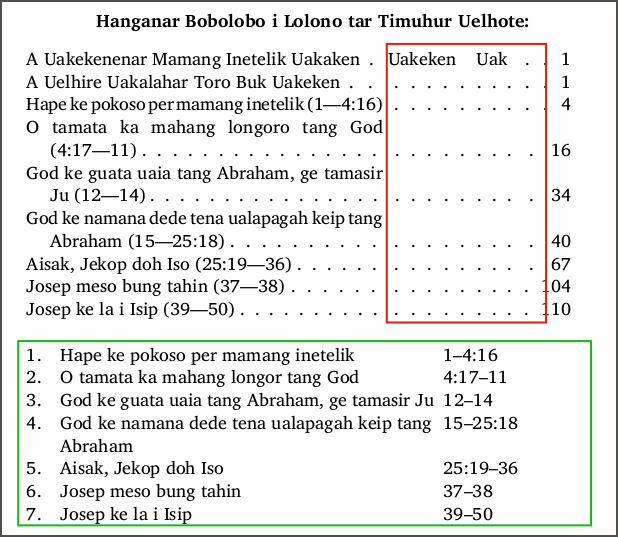
在某一階段,我確實將每個章節的 \mr 引用複製到 \toc2 行中(如我的模擬表格所示),但這沒有幫助,所以我手動將引用移動到了 \ms+\toc1 行中。
請問有什麼想法可以去除生成的目錄表格中空的 toc2 和 toc3 欄嗎?或者我是否應該直接在「前置事項」(Front Matter)中使用我手動輸入的表格,並在最後的排版步驟中為其添加頁碼?
I'm typesetting a single-book Genesis publication. We want to display 7 "Major Section" labels in the TOC, and the solution discussed here works, mostly.
https://support.bible/11592/toc-for-bible-modules
However, the TOC generated by PTXPrint insists on displaying empty columns for \toc2 and \toc3.
The green square in my screenshot shows my manually entered TOC lines as I want them (but with an empty page number column). Above this is the TOC generated by PTXPrint. The first line contains the entries for Genesis: toc1 "full name" toc 2 "short name" toc3 "abbreviation". I do not want this line in my TOC.
The Major Sections appear correctly, but they wrap poorly because of the missing toc2 and toc3 fields under each section. I want to get rid of the leaders in the red box, displaying just toc1 and page# columns. I have tried
- deleting the \toc* lines in GEN 1:0, but PT is too smart for me–it keeps re-inserting them.
- deleting the Scripture Reference List entries, but they keep popping back in both the List and in line one of the generated TOC.
- I entered just a full-stop in the Scr.Ref.List for each of the GEN entries, but the names still pop up in the TOC.
- I created a new project and imported GEN into it after deleting the toc entries. Somehow PT carried those pesky book name entries along into the new project!
I did, at one stage, duplicate \mr references for each section into \toc2 lines (as in my mock-up table), but this didn't help so I moved the references manually into the \ms+\toc1 lines.
Any thoughts on how to get rid of empty toc2 and toc3 columns in a generated TOC table, please? Or should I just use my manually entered table in the Front Matter, adding page numbers to it as the final typesetting step?
機器翻譯自 English








