Saya sedang melakukan typesetting untuk publikasi kitab Kejadian (Genesis) tunggal. Kami ingin menampilkan 7 label "Bagian Utama" (Major Section) di TOC, dan solusi yang dibahas di sini berhasil, sebagian besar.
https://support.bible/11592/toc-for-bible-modules
Namun, TOC yang dihasilkan oleh PTXPrint memaksa menampilkan kolom kosong untuk \toc2 dan \toc3.
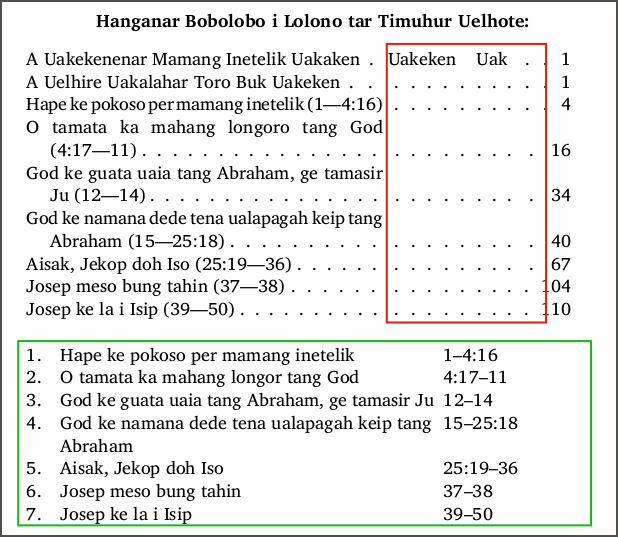
Kotak hijau di tangkapan layar saya menunjukkan baris TOC yang saya masukkan secara manual seperti yang saya inginkan (tetapi dengan kolom nomor halaman kosong). Di atasnya adalah TOC yang dihasilkan oleh PTXPrint. Baris pertama berisi entri untuk Kejadian: toc1 "nama lengkap" toc 2 "nama pendek" toc3 "singkatan". Saya tidak ingin baris ini ada di TOC saya.
Bagian Utama (Major Sections) muncul dengan benar, tetapi pembungkusnya buruk karena field toc2 dan toc3 yang hilang di bawah setiap bagian. Saya ingin menghilangkan leader (garis titik-titik) di kotak merah, hanya menampilkan kolom toc1 dan nomor halaman. Saya telah mencoba
- menghapus baris \toc* di GEN 1:0, tetapi PT terlalu pintar untuk saya–ia terus menyisipkannya kembali.
- menghapus entri Daftar Referensi Alkitab (Scripture Reference List), tetapi mereka terus muncul kembali baik di Daftar maupun di baris pertama TOC yang dihasilkan.
- Saya hanya memasukkan titik penuh (full-stop) di Scr.Ref.List untuk setiap entri GEN, tetapi nama-nama tersebut masih muncul di TOC.
- Saya membuat proyek baru dan mengimpor GEN ke dalamnya setelah menghapus entri toc. Entah bagaimana PT membawa entri nama kitab yang merepotkan itu ke proyek baru!
Pada satu tahap, saya menduplikasi referensi \mr untuk setiap bagian ke baris \toc2 (seperti di tabel mock-up saya), tetapi ini tidak membantu sehingga saya memindahkan referensi secara manual ke baris \ms+\toc1.
Apakah ada ide tentang cara menghilangkan kolom toc2 dan toc3 yang kosong di tabel TOC yang dihasilkan? Atau apakah saya sebaiknya hanya menggunakan tabel yang saya masukkan secara manual di Bagian Awal (Front Matter), menambahkan nomor halaman ke dalamnya sebagai langkah typesetting terakhir?
I'm typesetting a single-book Genesis publication. We want to display 7 "Major Section" labels in the TOC, and the solution discussed here works, mostly.
https://support.bible/11592/toc-for-bible-modules
However, the TOC generated by PTXPrint insists on displaying empty columns for \toc2 and \toc3.
The green square in my screenshot shows my manually entered TOC lines as I want them (but with an empty page number column). Above this is the TOC generated by PTXPrint. The first line contains the entries for Genesis: toc1 "full name" toc 2 "short name" toc3 "abbreviation". I do not want this line in my TOC.
The Major Sections appear correctly, but they wrap poorly because of the missing toc2 and toc3 fields under each section. I want to get rid of the leaders in the red box, displaying just toc1 and page# columns. I have tried
- deleting the \toc* lines in GEN 1:0, but PT is too smart for me–it keeps re-inserting them.
- deleting the Scripture Reference List entries, but they keep popping back in both the List and in line one of the generated TOC.
- I entered just a full-stop in the Scr.Ref.List for each of the GEN entries, but the names still pop up in the TOC.
- I created a new project and imported GEN into it after deleting the toc entries. Somehow PT carried those pesky book name entries along into the new project!
I did, at one stage, duplicate \mr references for each section into \toc2 lines (as in my mock-up table), but this didn't help so I moved the references manually into the \ms+\toc1 lines.
Any thoughts on how to get rid of empty toc2 and toc3 columns in a generated TOC table, please? Or should I just use my manually entered table in the Front Matter, adding page numbers to it as the final typesetting step?
Diterjemahkan secara otomatis dari English








