मैं एक एकल-पुस्तक उत्पत्ति (Genesis) प्रकाशन की टाइपसेटिंग कर रहा हूँ। हम TOC में 7 "मुख्य अनुभाग" (Major Section) लेबल प्रदर्शित करना चाहते हैं, और यहाँ चर्चा की गई समाधान, मुख्य रूप से, काम करती है।
https://support.bible/11592/toc-for-bible-modules
हालाँकि, PTXPrint द्वारा जनरेट किया गया TOC \toc2 और \toc3 के लिए खाली कॉलम प्रदर्शित करने पर अडिग है।
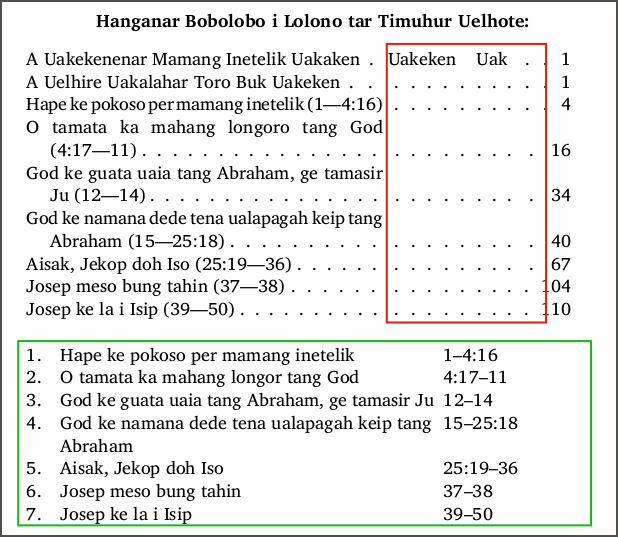
मेरी स्क्रीनशॉट में हरा वर्ग मेरे द्वारा मैनुअली दर्ज किए गए TOC पंक्तियों को दर्शाता है, जैसा कि मैं उन्हें चाहता हूँ (लेकिन पृष्ठ संख्या कॉलम खाली है)। इसके ऊपर PTXPrint द्वारा जनरेट किया गया TOC है। पहली पंक्ति में उत्पत्ति (Genesis) के प्रविष्टियाँ शामिल हैं: toc1 "पूरा नाम" toc 2 "छोटा नाम" toc3 "संक्षिप्त नाम"। मैं अपने TOC में इस पंक्ति को नहीं चाहता।
मुख्य अनुभाग (Major Sections) सही ढंग से प्रकट होते हैं, लेकिन प्रत्येक अनुभाग के नीचे toc2 और toc3 फ़ील्ड के अनुपस्थित होने के कारण वे खराब ढंग से लपेटे (wrap) जाते हैं। मैं लाल बॉक्स में लीडर्स (leaders) से छुटकारा पाना चाहता हूँ, ताकि केवल toc1 और page# कॉलम प्रदर्शित हों। मैंने प्रयास किया है
- GEN 1:0 में \toc* पंक्तियों को हटाने का, लेकिन PT मेरे लिए बहुत चतुर है–वह उन्हें बार-बार पुनः प्रविष्ट करता रहता है।
- पवित्र ग्रंथ संदर्भ सूची (Scripture Reference List) प्रविष्टियों को हटाने का, लेकिन वे सूची में और जनरेट किए गए TOC की पहली पंक्ति में वापस आ जाते हैं।
- मैंने GEN प्रविष्टियों में से प्रत्येक के लिए Scr.Ref.List में केवल एक पूर्ण-विराम (full-stop) दर्ज किया, लेकिन नाम अभी भी TOC में प्रकट होते हैं।
- मैंने एक नया परियोजना बनाया और toc प्रविष्टियों को हटाने के बाद GEN को उसमें आयात किया। किसी तरह PT ने उन परेशान करने वाली पुस्तक नाम प्रविष्टियों को नई परियोजना में ले आया!
मैंने एक चरण पर, प्रत्येक अनुभाग के लिए \mr संदर्भों को \toc2 पंक्तियों में डुप्लिकेट किया (जैसा कि मेरी मॉक-अप टेबल में है), लेकिन इससे मदद नहीं हुई, इसलिए मैंने संदर्भों को मैनुअली \ms+\toc1 पंक्तियों में स्थानांतरित कर दिया।
क्या आपकी कोई राय है कि जनरेट किए गए TOC टेबल में खाली toc2 और toc3 कॉलमों से कैसे छुटकारा पाया जाए, कृपया? या क्या मुझे बस फ्रंट मैटर (Front Matter) में अपनी मैनुअली दर्ज की गई टेबल का उपयोग करना चाहिए, और अंतिम टाइपसेटिंग चरण के रूप में उसमें पृष्ठ संख्याएँ जोड़नी चाहिए?
I'm typesetting a single-book Genesis publication. We want to display 7 "Major Section" labels in the TOC, and the solution discussed here works, mostly.
https://support.bible/11592/toc-for-bible-modules
However, the TOC generated by PTXPrint insists on displaying empty columns for \toc2 and \toc3.
The green square in my screenshot shows my manually entered TOC lines as I want them (but with an empty page number column). Above this is the TOC generated by PTXPrint. The first line contains the entries for Genesis: toc1 "full name" toc 2 "short name" toc3 "abbreviation". I do not want this line in my TOC.
The Major Sections appear correctly, but they wrap poorly because of the missing toc2 and toc3 fields under each section. I want to get rid of the leaders in the red box, displaying just toc1 and page# columns. I have tried
- deleting the \toc* lines in GEN 1:0, but PT is too smart for me–it keeps re-inserting them.
- deleting the Scripture Reference List entries, but they keep popping back in both the List and in line one of the generated TOC.
- I entered just a full-stop in the Scr.Ref.List for each of the GEN entries, but the names still pop up in the TOC.
- I created a new project and imported GEN into it after deleting the toc entries. Somehow PT carried those pesky book name entries along into the new project!
I did, at one stage, duplicate \mr references for each section into \toc2 lines (as in my mock-up table), but this didn't help so I moved the references manually into the \ms+\toc1 lines.
Any thoughts on how to get rid of empty toc2 and toc3 columns in a generated TOC table, please? Or should I just use my manually entered table in the Front Matter, adding page numbers to it as the final typesetting step?
English से मशीन-अनुवादित








