Estoy componiendo una publicación de un solo libro, Génesis. Queremos mostrar 7 etiquetas de "Sección Principal" en el índice, y la solución discutida aquí funciona, en su mayor parte.
https://support.bible/11592/toc-for-bible-modules
Sin embargo, el índice generado por PTXPrint insiste en mostrar columnas vacías para \toc2 y \toc3.
El cuadrado verde en mi captura de pantalla muestra las líneas del índice que ingresé manualmente tal como las quiero (pero con una columna de números de página vacía). Por encima de esto está el índice generado por PTXPrint. La primera línea contiene las entradas para Génesis: toc1 "nombre completo" toc 2 "nombre corto" toc3 "abreviatura". No quiero esta línea en mi índice.
Las Secciones Principales aparecen correctamente, pero se ajustan mal debido a los campos toc2 y toc3 faltantes bajo cada sección. Quiero deshacerme de los puntos de guía en el recuadro rojo, mostrando solo las columnas toc1 y nº de página. He intentado
- eliminar las líneas \toc* en GEN 1:0, pero PT es demasiado listo para mí: sigue reinsertándolas.
- eliminar las entradas de la Lista de Referencias Bíblicas, pero siguen apareciendo tanto en la Lista como en la primera línea del índice generado.
- Ingresé solo un punto final en la Lista de Ref. Bíblicas para cada una de las entradas de GEN, pero los nombres siguen apareciendo en el índice.
- Creé un nuevo proyecto e importé GEN en él después de eliminar las entradas toc. ¡De alguna manera, PT llevó esas molestas entradas de nombres de libro al nuevo proyecto!
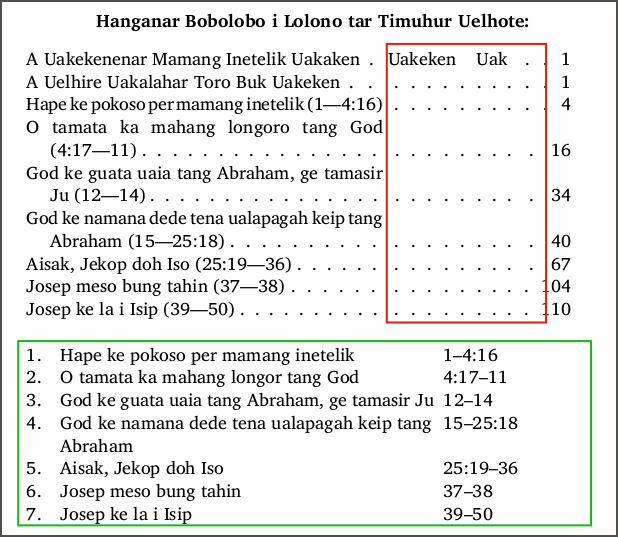
En una etapa, duplicé las referencias \mr de cada sección en líneas \toc2 (como en mi tabla de maqueta), pero esto no ayudó, así que moví las referencias manualmente a las líneas \ms+\toc1.
¿Alguna idea sobre cómo deshacerse de las columnas toc2 y toc3 vacías en una tabla de índice generada, por favor? ¿O debería simplemente usar mi tabla ingresada manualmente en el Material Preliminar, agregando los números de página como el último paso de composición?
I'm typesetting a single-book Genesis publication. We want to display 7 "Major Section" labels in the TOC, and the solution discussed here works, mostly.
https://support.bible/11592/toc-for-bible-modules
However, the TOC generated by PTXPrint insists on displaying empty columns for \toc2 and \toc3.
The green square in my screenshot shows my manually entered TOC lines as I want them (but with an empty page number column). Above this is the TOC generated by PTXPrint. The first line contains the entries for Genesis: toc1 "full name" toc 2 "short name" toc3 "abbreviation". I do not want this line in my TOC.
The Major Sections appear correctly, but they wrap poorly because of the missing toc2 and toc3 fields under each section. I want to get rid of the leaders in the red box, displaying just toc1 and page# columns. I have tried
- deleting the \toc* lines in GEN 1:0, but PT is too smart for me–it keeps re-inserting them.
- deleting the Scripture Reference List entries, but they keep popping back in both the List and in line one of the generated TOC.
- I entered just a full-stop in the Scr.Ref.List for each of the GEN entries, but the names still pop up in the TOC.
- I created a new project and imported GEN into it after deleting the toc entries. Somehow PT carried those pesky book name entries along into the new project!
I did, at one stage, duplicate \mr references for each section into \toc2 lines (as in my mock-up table), but this didn't help so I moved the references manually into the \ms+\toc1 lines.
Any thoughts on how to get rid of empty toc2 and toc3 columns in a generated TOC table, please? Or should I just use my manually entered table in the Front Matter, adding page numbers to it as the final typesetting step?
Traducción automática desde English








