0 votes
151 views

How do I get a small amount of space (thin space?) between the two quote marks of a nested set?

I would expect this to be automatically generated by PTXprint, so could there be a problem within the text itself, e.g. the wrong kind of quote mark being used?

PTXprint by (153 points) | 151 views

1 Answer

0 votes

I’m not entirely sure what the python does, but (assuming that the quotes as they get through to the XeTeX portion of things are recognised as quotation marks) with no spaces, etc. between them, then it will add \quotekernamount of space between them. I’m not entirely sure why, but the code currently says \quotekernamount=0pt. If it is 0pt, then the only kerning between the characters depends on the font’s in-built kerning.

Also, I can’t see any control in PTXprint’s user interface at the moment, not even on the TeXpert hacks page. Oops.
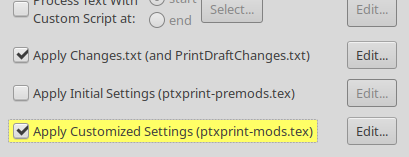
You can of course go to the advanced tab,
image
Ensure that there’s a tick / check on apply customised settings,
click on “Edit”, and then add a line something like:

\quotekernamount=0.3ex

(where 1ex is the height of an x in the font, you can of course use an absolute dimension, like pt or mm, etc)

The current list of quotes for which this apply are:
U+201C LEFT DOUBLE QUOTATION MARK
U+2018 LEFT SINGLE QUOTATION MARK
U+201D RIGHT DOUBLE QUOTATION MARK
U+2019 RIGHT SINGLE QUOTATION MARK

Ideally, it would also apply the same logic to low quotes, but I presume it should not apply it to mixtures of high and low quote marks.


by (1.1k points)

Related questions

0 votes
1 answer 165 views
After exporting in PTX Print, the << >> quotation marks used in Paratext still remains instead of converting to the " " ... with the ParaText PDF Export. What can i do about it?
anon580342 107 asked Sep 24, 2021
0 votes
1 answer 228 views
The project I want to print has quotation marks marked as < << >> > etc. Can I run a script to change these to smart quotes in the print processing? Thanks, Ross
EpiWaetMan 196 asked Jan 13, 2021
0 votes
1 answer 427 views
I'm finally at the point where I need to ask: is there any way to fix the issue of having to add a space ... selected in Checking > Quotation Rules', but something's not right
Paul 639 asked May 11, 2017
0 votes
2 answers 298 views
In one of my projects, two books have \ marks down through all the users in the project when I click on book permissions. What does that mean? How do I get rid of the slash marks?
anon819721 115 asked May 8, 2021
0 votes
2 answers 626 views
Both P8 and P9 allow Word-medial punctuation, but they work differently. I have a project where we sometimes use ... punctuation character in P9 although it was allowed in P8.
Iver Larsen 869 asked Jul 17, 2019
Welcome to Support Bible, where you can ask questions and receive answers from other members of the community.
For just as each of us has one body with many members, and these members do not all have the same function, so in Christ we, though many, form one body, and each member belongs to all the others.
Romans 12:4-5
3,037 questions
5,994 answers
5,661 comments
2,022 users





