No estoy del todo seguro de lo que hace el código de Python, pero (suponiendo que las comillas, tal como llegan a la parte de XeTeX, se reconocen como signos de puntuación de cita) y no hay espacios, etc. entre ellas, entonces se añadirá \quotekernamount de espacio entre ellas. No estoy del todo seguro de por qué, pero el código actual dice \quotekernamount=0pt. Si es 0pt, entonces el único ajuste de espacio entre los caracteres depende del ajuste de espacio integrado en la fuente.
Además, no veo ningún control en la interfaz de usuario de PTXprint en este momento, ni siquiera en la página de trucos de TeXpert. Ups.
Por supuesto, puede ir a la pestaña avanzada,
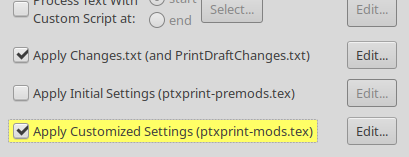
Asegúrese de que hay una marca de verificación en aplicar ajustes personalizados,
haga clic en “Editar” y luego agregue una línea como esta:
\quotekernamount=0.3ex
(donde 1ex es la altura de una x en la fuente; por supuesto, puede usar una dimensión absoluta, como pt o mm, etc.)
La lista actual de comillas a las que se aplica esto es:
U+201C COMILLA DOBLE IZQUIERDA
U+2018 COMILLA SIMPLE IZQUIERDA
U+201D COMILLA DOBLE DERECHA
U+2019 COMILLA SIMPLE DERECHA
Idealmente, también se aplicaría la misma lógica a las comillas bajas, pero supongo que no debería aplicarse a mezclas de comillas altas y bajas.
I’m not entirely sure what the python does, but (assuming that the quotes as they get through to the XeTeX portion of things are recognised as quotation marks) with no spaces, etc. between them, then it will add \quotekernamount of space between them. I’m not entirely sure why, but the code currently says \quotekernamount=0pt. If it is 0pt, then the only kerning between the characters depends on the font’s in-built kerning.
Also, I can’t see any control in PTXprint’s user interface at the moment, not even on the TeXpert hacks page. Oops.
You can of course go to the advanced tab,
Ensure that there’s a tick / check on apply customised settings,
click on “Edit”, and then add a line something like:
\quotekernamount=0.3ex
(where 1ex is the height of an x in the font, you can of course use an absolute dimension, like pt or mm, etc)
The current list of quotes for which this apply are:
U+201C LEFT DOUBLE QUOTATION MARK
U+2018 LEFT SINGLE QUOTATION MARK
U+201D RIGHT DOUBLE QUOTATION MARK
U+2019 RIGHT SINGLE QUOTATION MARK
Ideally, it would also apply the same logic to low quotes, but I presume it should not apply it to mixtures of high and low quote marks.
Traducción automática desde English








