嗨 @Mark_Skinner!歡迎加入 PTXprint 社群。
你不是第一個遇到這種奇怪行為的人。這很可能是由於 內文 選項卡底部的這些設定造成的:
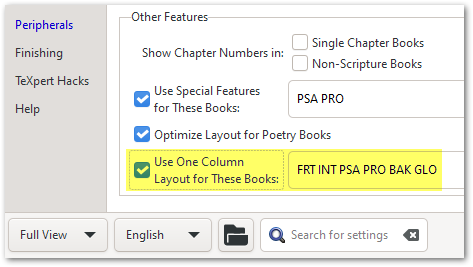
如果你看不到這些選項,請使用左下角的選項切換到「完整檢視」。
一些背景資訊:在幾個版本之前(也就是針對較舊的專案),這些設定預設是啟用的;但由於這造成了許多混淆,我們不再將外圍書卷包含在這個清單中。所以,這可能就是為什麼它只在一個專案中發生,而在其他專案中沒有(因為其他專案較新)。
但為我們辯護的是,工具提示(Tooltips)會告訴你在哪裡查看以解決這些意外結果:
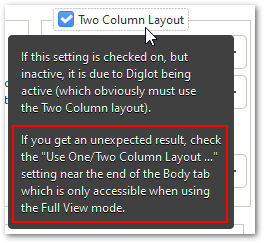
如果這不能立即解決問題,請告訴我,我會與你一起深入調查。但我有 99% 的把握認為這是問題的根源。
Hi @Mark_Skinner! Welcome to the PTXprint community.
You’re not the first one to have stumbled across this strange behavior. It is most likely due to these settings at the bottom of the Body tab:
If you don’t see these options, then change to “Full View” using the option at the bottom left corner.
Some history: Several versions ago, (i.e. for older projects), these settings were enabled by default; but because of all the confusion it caused, we no longer include the peripheral books in this list. So perhaps that’s why it is happening for one project and not the others (as they are newer).
But in our defense, the Tooltips tell you where to look to solve these unexpected outcomes:
If this doesn’t solve it immediately, then let me know and I’ll dig deeper with you. But I’m 99% certain that this is the cause of the issue.
機器翻譯自 English








