你好 @Mark_Skinner!欢迎来到 PTXprint 社区。
你不是第一个遇到这种奇怪行为的人。这很可能是由于 正文(Body)选项卡底部的这些设置造成的:
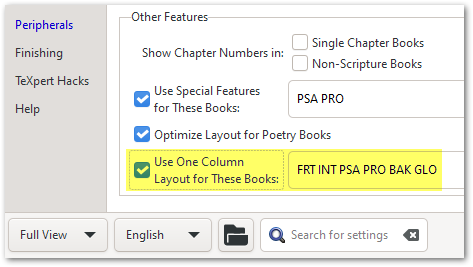
如果你看不到这些选项,请使用左下角的选项切换到“完整视图”(Full View)。
一些背景信息:在几个版本之前(即对于较旧的项目),这些设置是默认启用的;但由于它造成了很多混乱,我们不再将此列表中包含外围书卷。所以,这可能就是为什么它在一个项目中发生而在其他项目中没有发生(因为其他项目较新)的原因。
但作为我们的辩护,工具提示(Tooltips)会告诉你在哪里查找以解决这些意外结果:
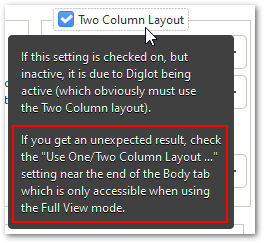
如果这不能立即解决问题,请告诉我,我会和你一起深入挖掘。但我有 99% 的把握认为这是问题的原因。
Hi @Mark_Skinner! Welcome to the PTXprint community.
You’re not the first one to have stumbled across this strange behavior. It is most likely due to these settings at the bottom of the Body tab:
If you don’t see these options, then change to “Full View” using the option at the bottom left corner.
Some history: Several versions ago, (i.e. for older projects), these settings were enabled by default; but because of all the confusion it caused, we no longer include the peripheral books in this list. So perhaps that’s why it is happening for one project and not the others (as they are newer).
But in our defense, the Tooltips tell you where to look to solve these unexpected outcomes:
If this doesn’t solve it immediately, then let me know and I’ll dig deeper with you. But I’m 99% certain that this is the cause of the issue.
机器翻译自 English








