Halo @Mark_Skinner! Selamat datang di komunitas PTXprint.
Anda bukan orang pertama yang mengalami perilaku aneh ini. Kemungkinan besar ini disebabkan oleh pengaturan di bagian bawah tab Body:
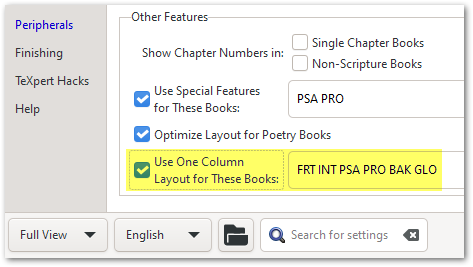
Jika Anda tidak melihat opsi-opsi ini, maka ubah ke “Full View” menggunakan opsi di sudut kiri bawah.
Sejarah singkat: Beberapa versi yang lalu, (yaitu untuk proyek-proyek yang lebih lama), pengaturan ini diaktifkan secara default; tetapi karena banyak kebingungan yang ditimbulkannya, kami tidak lagi memasukkan buku-buku periferal dalam daftar ini. Jadi mungkin itulah mengapa hal ini terjadi pada satu proyek dan tidak pada yang lain (karena yang lain lebih baru).
Tetapi sebagai pembelaan kami, Tooltips memberi tahu Anda di mana harus mencari untuk menyelesaikan hasil yang tidak terduga ini:
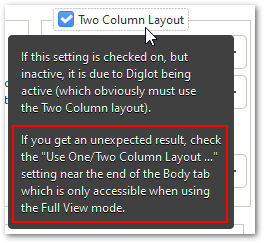
Jika ini tidak menyelesaikannya segera, maka beri tahu saya dan saya akan menyelidiki lebih dalam bersama Anda. Tetapi saya 99% yakin bahwa ini adalah penyebab masalahnya.
Hi @Mark_Skinner! Welcome to the PTXprint community.
You’re not the first one to have stumbled across this strange behavior. It is most likely due to these settings at the bottom of the Body tab:
If you don’t see these options, then change to “Full View” using the option at the bottom left corner.
Some history: Several versions ago, (i.e. for older projects), these settings were enabled by default; but because of all the confusion it caused, we no longer include the peripheral books in this list. So perhaps that’s why it is happening for one project and not the others (as they are newer).
But in our defense, the Tooltips tell you where to look to solve these unexpected outcomes:
If this doesn’t solve it immediately, then let me know and I’ll dig deeper with you. But I’m 99% certain that this is the cause of the issue.
Diterjemahkan secara otomatis dari English








