Hola, @Mark_Skinner. Bienvenido a la comunidad de PTXprint.
No eres la primera persona que se topa con este comportamiento extraño. Lo más probable es que se deba a estos ajustes en la parte inferior de la pestaña Body:
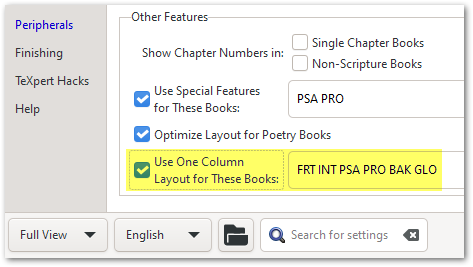
Si no ves estas opciones, cambia a “Full View” usando la opción en la esquina inferior izquierda.
Un poco de historia: hace varias versiones (es decir, para proyectos más antiguos), estos ajustes estaban habilitados por defecto; pero debido a toda la confusión que causaban, ya no incluimos los libros periféricos en esta lista. Por lo tanto, es posible que esa sea la razón por la que ocurre en un proyecto y no en los demás (ya que estos son más nuevos).
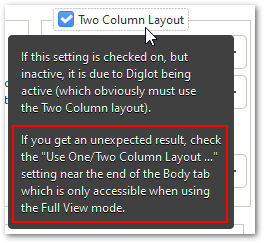
Pero, en nuestra defensa, los Tooltips te indican dónde buscar para resolver estos resultados inesperados:
Si esto no lo resuelve de inmediato, avísame y profundizaré más contigo. Pero estoy al 99% seguro de que esta es la causa del problema.
Hi @Mark_Skinner! Welcome to the PTXprint community.
You’re not the first one to have stumbled across this strange behavior. It is most likely due to these settings at the bottom of the Body tab:
If you don’t see these options, then change to “Full View” using the option at the bottom left corner.
Some history: Several versions ago, (i.e. for older projects), these settings were enabled by default; but because of all the confusion it caused, we no longer include the peripheral books in this list. So perhaps that’s why it is happening for one project and not the others (as they are newer).
But in our defense, the Tooltips tell you where to look to solve these unexpected outcomes:
If this doesn’t solve it immediately, then let me know and I’ll dig deeper with you. But I’m 99% certain that this is the cause of the issue.
Traducción automática desde English








