0 votes
165 views

After exporting in PTX Print, the << >> quotation marks used in Paratext still remains instead of converting to the " " quotation marks as seen with the ParaText PDF Export.

What can i do about it?

PTXprint by (107 points) | 165 views

1 Answer

0 votes

On the Advanced tab, you will need to turn on the option shown here:
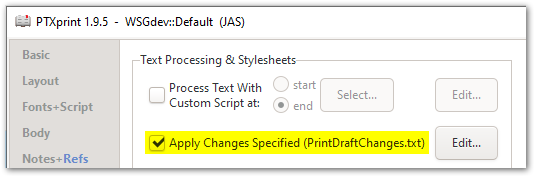
image

This file normally contains rules that convert such codes into their actual characters:
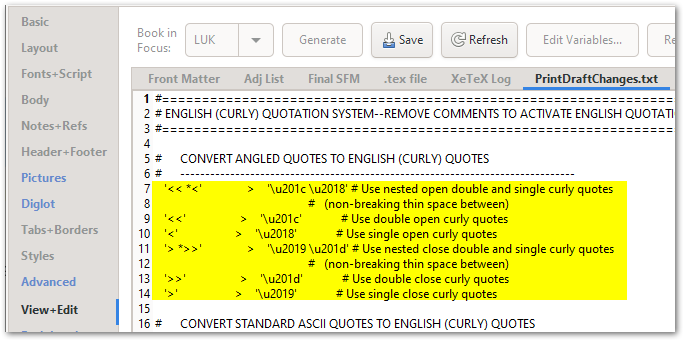
image

Just in case your PrintDraftChanges.txt file doesn’t already contain these rules, here they are for you to copy-and-paste:

#      CONVERT ANGLED QUOTES TO ENGLISH (CURLY) QUOTES
#      -------------------------------------------------------------------------------
   '<< *<'               >    '\u201c \u2018' # Use nested open double and single curly quotes
                                                   #   (non-breaking thin space between)
   '<<'                  >    '\u201c'             # Use double open curly quotes
   '<'                   >    '\u2018'             # Use single open curly quotes 
   '> *>>'               >    '\u2019 \u201d' # Use nested close double and single curly quotes
                                                   #   (non-breaking thin space between)
   '>>'                  >    '\u201d'             # Use double close curly quotes
   '>'                   >    '\u2019'             # Use single close curly quotes

by (3.2k points)

Thanks @ mjpenny, it changes correctly.
Blessings.

Related questions

0 votes
1 answer 229 views
The project I want to print has quotation marks marked as < << >> > etc. Can I run a script to change these to smart quotes in the print processing? Thanks, Ross
EpiWaetMan 196 asked Jan 13, 2021
0 votes
1 answer 152 views
How do I get a small amount of space (thin space?) between the two quote marks of a nested set? I would expect this ... text itself, e.g. the wrong kind of quote mark being used?
Ruth Mathys 153 asked Nov 6, 2023
0 votes
1 answer 177 views
Hi, I've a problem with quotation marks in my Paratext project. Whenever I want to type standard quotation marks ( ... this is happening and how to fix it? Thanks, Christopher
christopher_meyer 106 asked Aug 31, 2023
0 votes
2 answers 298 views
In one of my projects, two books have \ marks down through all the users in the project when I click on book permissions. What does that mean? How do I get rid of the slash marks?
anon819721 115 asked May 8, 2021
0 votes
2 answers 627 views
Both P8 and P9 allow Word-medial punctuation, but they work differently. I have a project where we sometimes use ... punctuation character in P9 although it was allowed in P8.
Iver Larsen 869 asked Jul 17, 2019
Welcome to Support Bible, where you can ask questions and receive answers from other members of the community.
There is neither Jew nor Gentile, neither slave nor free, nor is there male and female, for you are all one in Christ Jesus.
Galatians 3:28
3,037 questions
5,994 answers
5,661 comments
2,022 users






