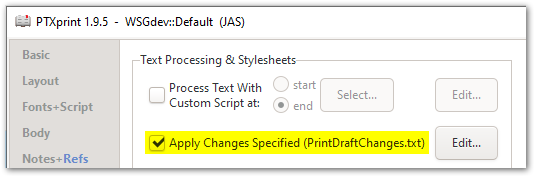
En la pestaña Avanzado, deberá activar la opción que se muestra aquí:
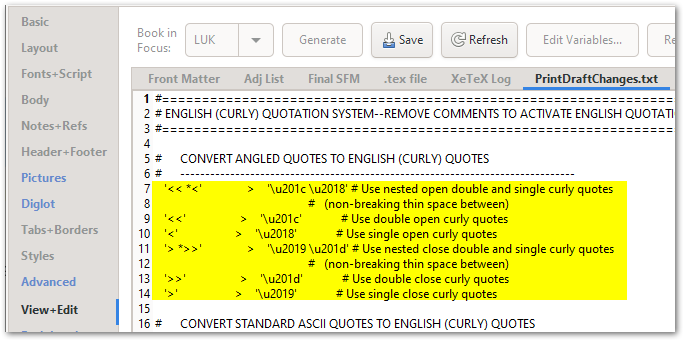
Este archivo normalmente contiene reglas que convierten dichos códigos en sus caracteres reales:
Por si acaso su archivo PrintDraftChanges.txt no contiene ya estas reglas, aquí las tiene para copiar y pegar:
#      CONVERT ANGLED QUOTES TO ENGLISH (CURLY) QUOTES
#      -------------------------------------------------------------------------------
   '<< *<'               >    '\u201c \u2018' # Use nested open double and single curly quotes
                                                   #   (non-breaking thin space between)
   '<<'                  >    '\u201c'             # Use double open curly quotes
   '<'                   >    '\u2018'             # Use single open curly quotes
   '> *>>'               >    '\u2019 \u201d' # Use nested close double and single curly quotes
                                                   #   (non-breaking thin space between)
   '>>'                  >    '\u201d'             # Use double close curly quotes
   '>'                   >    '\u2019'             # Use single close curly quotes
On the Advanced tab, you will need to turn on the option shown here:
This file normally contains rules that convert such codes into their actual characters:
Just in case your PrintDraftChanges.txt file doesn’t already contain these rules, here they are for you to copy-and-paste:
#      CONVERT ANGLED QUOTES TO ENGLISH (CURLY) QUOTES
#      -------------------------------------------------------------------------------
   '<< *<'               >    '\u201c \u2018' # Use nested open double and single curly quotes
                                                   #   (non-breaking thin space between)
   '<<'                  >    '\u201c'             # Use double open curly quotes
   '<'                   >    '\u2018'             # Use single open curly quotes
   '> *>>'               >    '\u2019 \u201d' # Use nested close double and single curly quotes
                                                   #   (non-breaking thin space between)
   '>>'                  >    '\u201d'             # Use double close curly quotes
   '>'                   >    '\u2019'             # Use single close curly quotes
Traducción automática desde English








