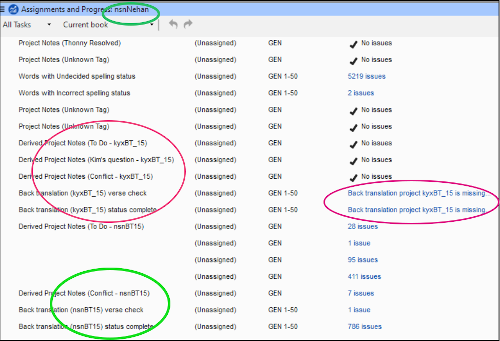
我自訂了一個專案計畫,然後將其儲存為基礎計畫(Base plan)並應用到第二個專案。第一個專案包含兩個不同的相關 BT 專案(雖然不理想,但對這個團隊而言是必要的)。我指定了涉及這兩個 "kyx" BT 專案的檢查項目。現在,對於第二個專案(按照常規,它只有一個 BT 專案),專案計畫中包含了指定第二個 "kyx" BT 的檢查項目。然而,"nsn" 專案與 kyx 無關,這些檢查項目(截圖中以紅色標記)成了孤兒項目,而且非常礙事!
請問我該如何移除截圖中紅圈標記的檢查項目?在截圖中,綠圈標記的是屬於正確 "nsn" 專案的任務。
我嘗試在專案計畫(Project Plan)設定畫面中編輯任務清單,但這些 "kyx" 任務甚至沒有出現在那裡!
I customized a project plan, then saved it as a Base plan and applied it to a second project. The first project includes two different associated BT projects (not ideal but necessary for this team). I specified checks involving both of the "kyx" BT projects. Now for the second project (which, as is normal, has only one BT project), the project plan contains checks that specify the second "kyx" BT. However, the "nsn" project is not related to kyx and these checks (marked red in the screenshot) are orphaned and in the way!
How can I get rid of the checks circled in red, please? In the screenshot the green circles mark tasks pertaining to the correct "nsn" project.
I tried to edit the tasks list in the Project Plan setup screen, but these "kyx" tasks don't even appear there!
機器翻譯自 English








