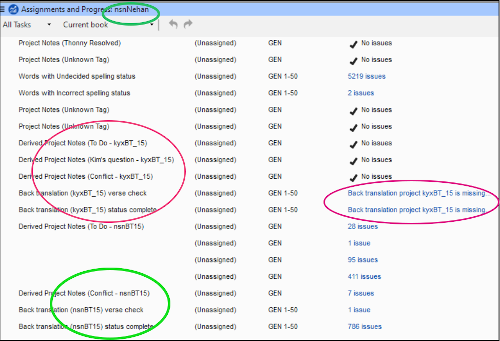
我自定义了一个项目计划,然后将其保存为 Base plan 并应用于第二个项目。第一个项目包含两个不同的关联 BT 项目(虽然不理想,但对该团队来说是必要的)。我指定了涉及这两个 "kyx" BT 项目的检查。现在,对于第二个项目(按照惯例,它只有一个 BT 项目),项目计划中包含指定第二个 "kyx" BT 的检查。然而,"nsn" 项目与 kyx 无关,这些检查(在截图中标红)是孤立的,而且碍事!
请问我该如何删除红圈中的检查?在截图中,绿圈标记的是属于正确的 "nsn" 项目的任务。
我尝试在 Project Plan 设置屏幕中编辑任务列表,但这些 "kyx" 任务甚至没有出现在那里!
I customized a project plan, then saved it as a Base plan and applied it to a second project. The first project includes two different associated BT projects (not ideal but necessary for this team). I specified checks involving both of the "kyx" BT projects. Now for the second project (which, as is normal, has only one BT project), the project plan contains checks that specify the second "kyx" BT. However, the "nsn" project is not related to kyx and these checks (marked red in the screenshot) are orphaned and in the way!
How can I get rid of the checks circled in red, please? In the screenshot the green circles mark tasks pertaining to the correct "nsn" project.
I tried to edit the tasks list in the Project Plan setup screen, but these "kyx" tasks don't even appear there!
机器翻译自 English








