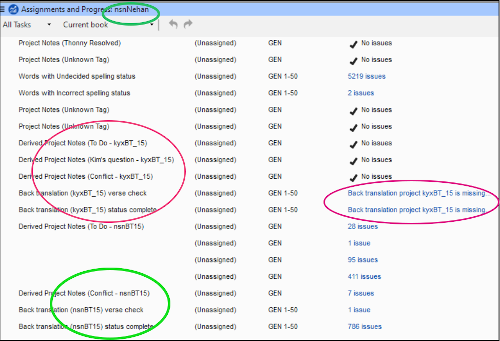
Saya menyesuaikan rencana proyek, lalu menyimpannya sebagai rencana Dasar (Base plan) dan menerapkannya ke proyek kedua. Proyek pertama mencakup dua proyek BT terkait yang berbeda (tidak ideal, tetapi diperlukan untuk tim ini). Saya menentukan pemeriksaan yang melibatkan kedua proyek BT "kyx". Sekarang, untuk proyek kedua (yang, seperti biasa, hanya memiliki satu proyek BT), rencana proyek berisi pemeriksaan yang menentukan proyek BT "kyx" kedua. Namun, proyek "nsn" tidak terkait dengan kyx, dan pemeriksaan-pemeriksaan ini (ditandai merah di tangkapan layar) menjadi yatim piatu dan menghalangi!
Bagaimana cara saya menghilangkan pemeriksaan yang dilingkari merah, tolong? Di tangkapan layar, lingkaran hijau menandai tugas-tugas yang berkaitan dengan proyek "nsn" yang benar.
Saya mencoba mengedit daftar tugas di layar pengaturan Project Plan, tetapi tugas-tugas "kyx" ini bahkan tidak muncul di sana!
I customized a project plan, then saved it as a Base plan and applied it to a second project. The first project includes two different associated BT projects (not ideal but necessary for this team). I specified checks involving both of the "kyx" BT projects. Now for the second project (which, as is normal, has only one BT project), the project plan contains checks that specify the second "kyx" BT. However, the "nsn" project is not related to kyx and these checks (marked red in the screenshot) are orphaned and in the way!
How can I get rid of the checks circled in red, please? In the screenshot the green circles mark tasks pertaining to the correct "nsn" project.
I tried to edit the tasks list in the Project Plan setup screen, but these "kyx" tasks don't even appear there!
Diterjemahkan secara otomatis dari English








