Saya berhasil melihat di komputer, dan file C:\Program Files (x86)\Paratext 9\LocData\fr.xml lebih lama, jadi saya mengeluarkannya dari folder itu dan memulai ulang Paratext - itu tampaknya memperbaiki masalah elemen UI yang usang. Terima kasih, anon848905, atas pengingatnya.
Dan terima kasih, AWR, atas petunjuk untuk memeriksa tampilan di kumpulan teks tersebut. Tampilannya diatur ke Preview (Aperçu), di mana tanda hubung tidak muncul dalam teks, tetapi mereka muncul di panel ayat tunggal di sebelah kiri (lihat al-masjuun / almasjuun):
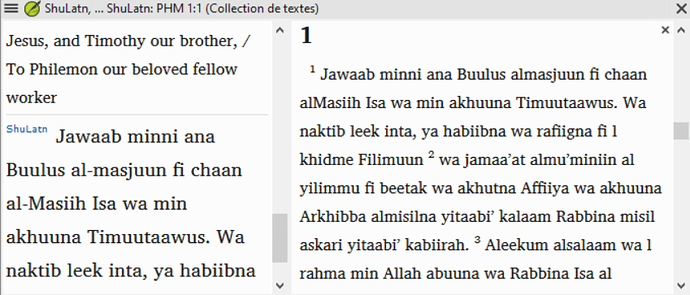
image849×363 102 KB
Jika saya mengubah tampilan ke Standard, maka tanda hubung muncul (bersama dengan SFM, yang tidak terlalu membantu):
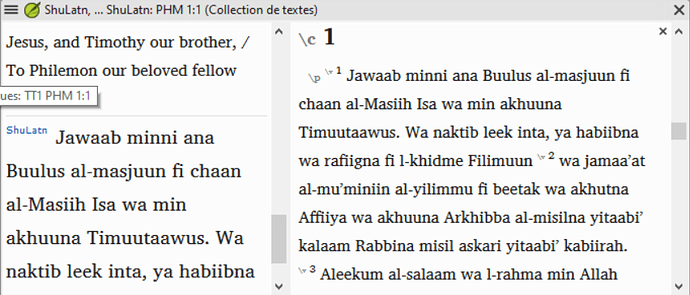
image852×365 102 KB
Maka saya meninggalkan tampilan sebagai Standard untuk saat ini, agar kita bisa memiliki tanda hubung. Ini terjadi di komputer saya, serta di komputer penerjemah. Tetapi ShuLatn adalah sumber daya standar sekarang, jadi pengembang harus mampu mereplikasi masalahnya. (Saya akan melaporkan masalah...) Ini bukan tanda hubung khusus, hanya standar U+002D, jadi saya tidak tahu mengapa itu melakukannya.
Terima kasih atas bantuan Anda.
I was able to look on the computer, and the C:\Program Files (x86)\Paratext 9\LocData\fr.xml file was older, so I pulled it out of that folder and restarted Paratext - that seemed to fix the old UI element problem. Thanks, anon848905, for the reminder.
And thanks, AWR, for the pointer to check the view in that text collection. The view was set to Preview (Aperçu), where the hyphens don’t appear in the text, but they do appear in the single verse pane to the left (see al-masjuun / almasjuun):
image849×363 102 KB
If I change the view to Standard, then the hyphens appear (along with the SFMs, which is not real helpful):
image852×365 102 KB
So I’m leaving the view as Standard for now, so we can have the hyphens. This happens on my computer, as well as on the translator’s computer. But ShuLatn is a standard resource now, so the developers should be able to replicate the problem. (I’ll report a problem…) These are not special hyphens, just the standard U+002D, so I don’t know why it is doing that.
Thanks for your help.
Diterjemahkan secara otomatis dari English








