Wasn’t sure where to report this bug fix for the Show Project Plan Html script, found in the project Custom Tools > Admin menu. I noticed that only the last stage was showing the icon for “When previous stage is complete”. In stage 6 you get the hamburger-like icon:
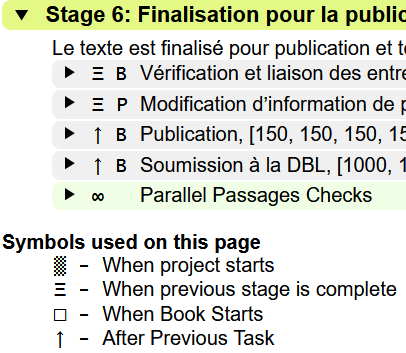
But in stage 5, where there should be the icon, it is blank:
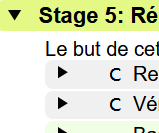
It looks like this is because there is an additional text value in the tag that isn’t being handled (maybe a new one in later versions of Paratext?). The code in ProjectPlanHtml.py needs to add the line with WhenStageIsCompleteByChapter below (around line 171):
def symbolFor(strTerm):
aDict = {'WhenProjectStarts':'▒',
         'WhenStageIsComplete':'Ξ',
         'WhenStageIsCompleteByChapter':'Ξ',
         'WhenBookStarts':'□',
         'AfterPreviousTaskForChapter':'↑',
         'AfterPreviousTaskForBook':'↑',
         'ManualByChapter':'C',
         'ManualByProject':'P',
         'Manual':'B',
         'Auto' : '∞'}
There is another mistake in the ProjectPlanImport.py module, around line 51. What was:
            elif (strToken, enumType) == ('EditingRequired',parser.BEGIN):
            self.availability = 'Yes'
            parser.parseSkipUntil('EditingRequired', parser.END)
should be changed to:
            elif (strToken, enumType) == ('EditingRequired',parser.BEGIN):
            self.editingRequired = 'Yes'
            parser.parseSkipUntil('EditingRequired', parser.END)
I’m not sure if this last change is necessary to fix the problem at hand, but it was obviously the original author’s intention to modify the editingRequired variable instead of the availability variable, and I thought originally that that error might be causing the problem. Probably best to change it as well…








