Gracias por enviar el archivo comprimido. Todavía no estoy seguro de cómo era diferente su nuevo PDF, pero descubrí que ya existe un .pdf (con un nombre inapropiado) en la carpeta C:\Program Files\ptxprint\PDFassets\border-art que es 'más alto' y está diseñado para la escritura árabe:
A5 section head border(RTL).pdf - desafortunadamente, no funciona tal cual debido a los (paréntesis) en el nombre del archivo (pero esto se corregirá en la próxima versión de PTXprint).
Pero, como solución temporal, si cambia el nombre del archivo PDF y luego usa ese PDF, funciona muy bien para lo que necesita y se escala sin distorsión.
Por lo tanto, por ejemplo, cambie el nombre a:
A5 section head border-RTL-taller.pdf
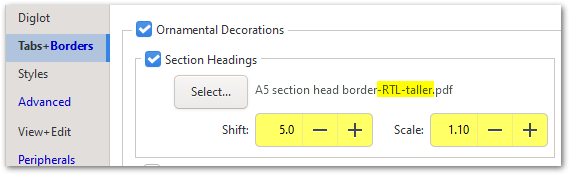
Observe que también puede DESPLAZAR el gráfico ligeramente hacia abajo y ESCALARLO para que sea más grande si es necesario.
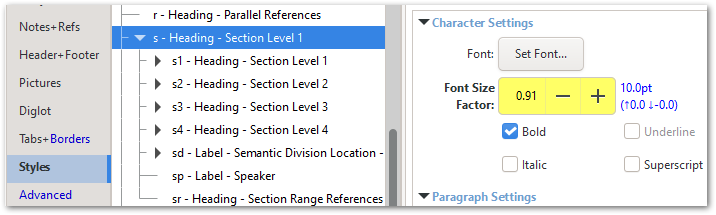
Y quizás desee considerar hacer un pequeño cambio en el tamaño del estilo \s para que todas las diacríticas superiores e inferiores quepan en el espacio disponible.
¡Todo encaja bastante bien una vez que tiene la configuración correcta!
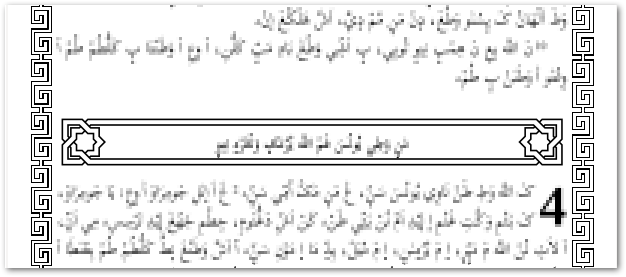
Parece que el borde de texto generado dinámicamente también necesita algunos ajustes en la configuración:
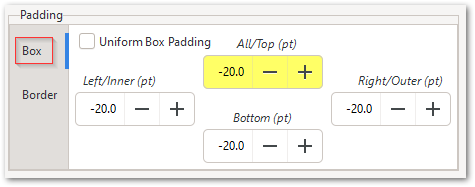
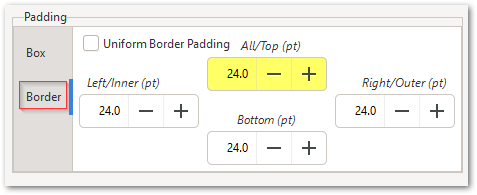
Tenga en cuenta que hay configuraciones de relleno de caja (Box padding) y relleno de borde (Border padding); y podría ayudar usar un relleno de caja (Box Padding) negativo.
Thanks for sending the archive. I'm still not sure how your new PDF was different, but I found that there is already a (badly named) .pdf in the C:\Program Files\ptxprint\PDFassets\border-art folder which is 'taller' and designed for Arabic script:
A5 section head border(RTL).pdf - unfortunately, it doesn't work as it is, due to the (parentheses) in the filename (but this will be fixed in the next release of PTXprint).
But, as a workaround, if you change the PDF file name and then use that PDF, it works very well for what you need, and scales without distorting.
So, for example, change the name to be:
A5 section head border-RTL-taller.pdf
Notice that you can also SHIFT the graphic down slightly, and SCALE it to be larger if needed.
And you may want to consider making a small change in size to the \s Style so that the upper and lower diacritics all fit in the space available.
It all fits quite well once you've got the right settings!
It looks like the dynamically-generated Text Border also needs some settings tweaked:
Note that there are Box padding and Border padding settings; and it might help to use negative Box Padding.
Traducción automática desde English








