O Mark pediu que houvesse algo aqui sobre como adicionar páginas de um PDF.
(veja também inserção de um PDF inteiro)
Então, hum, aqui vai uma primeira tentativa.
Vamos supor que temos um PDF de 2 páginas… Acabei de criar um. Aqui está na visualização de 2 páginas:
Estou usando um dos arquivos de teste, que tem cabeçalhos de seção elaborados e 'livros' de página única para GEN, LEV (a página com rosas) e MRK, que tem 2 páginas:
-
Coloque o arquivo no diretório figures do projeto (~/Paratext9Projects/PROJID/figures no linux). Essa etapa simples significa que o arquivo também fica disponível para outras pessoas, ou até mesmo para seus outros computadores, quando você tiver feito send+receive (enviar/receber) com o Paratext o suficiente em computadores suficientes.
-
Abra a aba de figuras no PTXprint e clique em 'Add' (Adicionar)

-
Selecione o arquivo PDF
-
Defina a referência de âncora. Neste exemplo, estou trabalhando em um arquivo de teste que não tem nada entre LEV 1.7 e MRK 1:1. Vou dizer para incluir a imagem após LEV 1.7.

-
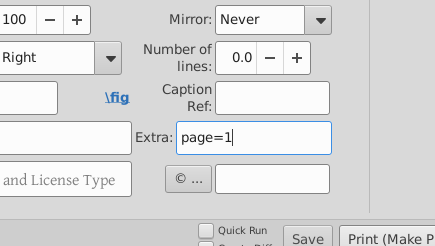
Selecione a página do arquivo PDF que queremos, digitando page=1 na caixa de extras:
-
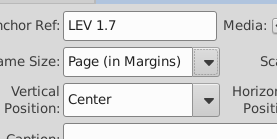
Defina o tamanho… Queremos números de página aqui, então vou selecionar Page (in Margins) (Página (nas Margens))
-
Pressione print (imprimir), oh, olhe, está lá:
-
Vamos adicionar a outra página, desta vez sem números de página… então Adicionar imagem, selecione o arquivo e o número da página. Ei, isso é estranho, por que page=1 ainda está lá? (@mjpenny)? Defina a âncora, LEV 1.7 novamente, defina o tamanho da página para Page (to Edge) (Página (até a Borda)) E pressione print (imprimir)…
Oh. Nenhuma imagem.
Parece que, embora o TeX possa lidar com múltiplas cópias de 'a mesma imagem' (mesmo que seja a página 2, não a página 1) na mesma referência, a interface do usuário não quer fazer isso por nós. Ela simplesmente ignora a segunda página.
Vamos definir a âncora da primeira página como LEV 1.6 e a segunda como LEV 1.7 (lembre-se de usar um ponto, não dois-pontos, ao fornecer as referências de âncora!)
TaDa! temos as duas páginas. Coisas para notar:
- As duas páginas são tratadas como imagens separadas quando você faz assim.
- Se selecionarmos
Page (to Margins) (Página (até as Margens)), então as linhas da grade, e os cabeçalhos e rodapés de página são incluídos; se dissermos Page (to Edge) (Página (até a Borda)), eles não são.
- Se você olhasse com atenção, veria que há uma rosa em LEV1.6, além da imagem de página inteira. O XeTeX não se importa com múltiplas imagens ancoradas em um versículo, foi apenas a interface do usuário ficando irritada e não escrevendo o arquivo.
- O espelhamento e a rotação funcionam (embora espelhar talvez não seja a coisa mais bonita de se fazer com texto!)
Mark asked that there be something here about how to add pages from a PDF.
(see also inserting an entire PDF)
So, urm, here’s a first go.
Let’s assume we have a 2 page PDF… I’ve just made one. Here it is in 2 page view:
I’m using one of the test files, which has fancy section headers and single page ‘books’ for GEN, LEV (the page with roses), and MRK, which has 2 pages:
-
Put the file into the project’s figures directory (~/Paratext9Projects/PROJID/figures on linux). This simple step means that the file becomes available to others too, or even your other computers, when you’ve done send+receive with Paratext enough times on enough computers.
-
Open the figures tab on PTXprint and click on ‘Add’
-
Select the PDF file
-
Set the anchor reference. For this example, I’m working in a test file that has nothing between LEV 1.7 and MRK 1:1. I’ll tell it to include the image after LEV 1.7.
-
Select the page of the PDF file that we want, by entering page=1 in the extras box:
-
Set the size… We want page numbers here, so I’ll select Page (in Margins)
-
Press print, oh, look there it is:
-
Lets add the other page, this time without page numbers… so Add image, select the file, and the page number. Hey, that’s odd, why is page=1 still there? (@mjpenny)? Set the anchor, LEV 1.7 again, set the page size to be Page (to Edge) And hit print…
Oh. No picture.
It seems that while TeX can cope with multple copies of ‘the same image’ (even if it is page 2, not page 1) on the same reference, the user interface doesn’t want to do that for us. It just ignores the second page.
Let’s set the anchor for the first page to LEV 1.6 and the second to LEV 1.7 (remember to use a dot, not a colon when giving the anchor references!)
TaDa! we have both pages. Things to notice:
- The two pages are treated as separate images when you do it this way.
- If we select
Page (to Margins), then the grid lines, and page headers and footers get included, if we say Page (to Edge) they don’t.
- If you looked carefully, then you’d see that there’s a rose on LEV1.6 as well as the full page image. XeTeX doesn’t mind multiple images anchored to one verse, it was just the user interface getting uppity and not writing the file.
- Mirroring and rotation work (though perhaps mirroring isn’t the nicest thing to do to text!)
Tradução automática de English








