Mark meminta agar ada sesuatu di sini tentang cara menambahkan halaman dari PDF.
(lihat juga menyisipkan seluruh PDF)
Jadi, erm, ini percobaan pertama.
Mari kita asumsikan kita memiliki PDF 2 halaman… Saya baru saja membuatnya. Berikut ini dalam tampilan 2 halaman:
Saya menggunakan salah satu file uji, yang memiliki header bagian yang rumit dan 'buku' satu halaman untuk GEN, LEV (halaman dengan bunga mawar), dan MRK, yang memiliki 2 halaman:
-
Letakkan file ke dalam direktori figures proyek (~/Paratext9Projects/PROJID/figures di linux). Langkah sederhana ini berarti file tersebut juga tersedia untuk orang lain, atau bahkan komputer lain Anda, setelah Anda melakukan send+receive dengan Paratext cukup banyak kali di cukup banyak komputer.
-
Buka tab figures di PTXprint dan klik 'Add'

-
Pilih file PDF
-
Atur referensi anchor. Untuk contoh ini, saya bekerja di file uji yang tidak memiliki apa pun antara LEV 1.7 dan MRK 1:1. Saya akan menyuruhnya menyertakan gambar setelah LEV 1.7.

-
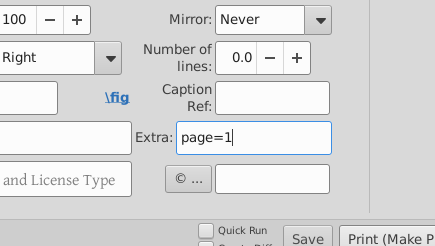
Pilih halaman file PDF yang kita inginkan, dengan memasukkan page=1 di kotak extras:
-
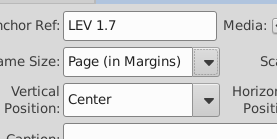
Atur ukuran… Kita ingin nomor halaman di sini, jadi saya akan memilih Page (in Margins)
-
Tekan print, oh, lihat di sana:
-
Mari kita tambahkan halaman lainnya, kali ini tanpa nomor halaman… jadi Add image, pilih file, dan nomor halaman. Hei, aneh, mengapa page=1 masih ada di sana? (@mjpenny)? Atur anchor, LEV 1.7 lagi, atur ukuran halaman menjadi Page (to Edge) Dan tekan print…
Oh. Tidak ada gambar.
Sepertinya meskipun TeX dapat menangani beberapa salinan 'gambar yang sama' (bahkan jika itu halaman 2, bukan halaman 1) pada referensi yang sama, antarmuka pengguna tidak ingin melakukan itu untuk kita. Itu hanya mengabaikan halaman kedua.
Mari kita atur anchor untuk halaman pertama menjadi LEV 1.6 dan yang kedua menjadi LEV 1.7 (ingat untuk menggunakan titik, bukan titik dua saat memberikan referensi anchor!)
TaDa! kita memiliki kedua halaman. Hal-hal yang perlu diperhatikan:
- Kedua halaman diperlakukan sebagai gambar terpisah ketika Anda melakukannya dengan cara ini.
- Jika kita memilih
Page (to Margins), maka garis grid, dan header serta footer halaman disertakan, jika kita mengatakan Page (to Edge) mereka tidak disertakan.
- Jika Anda melihat dengan cermat, maka Anda akan melihat bahwa ada bunga mawar di LEV1.6 serta gambar halaman penuh. XeTeX tidak keberatan dengan beberapa gambar yang di-anchor ke satu ayat, itu hanya antarmuka pengguna yang rewel dan tidak menulis file.
- Mirroring dan rotasi berfungsi (meskipun mungkin mirroring bukan hal terbaik untuk dilakukan pada teks!)
Mark asked that there be something here about how to add pages from a PDF.
(see also inserting an entire PDF)
So, urm, here’s a first go.
Let’s assume we have a 2 page PDF… I’ve just made one. Here it is in 2 page view:
I’m using one of the test files, which has fancy section headers and single page ‘books’ for GEN, LEV (the page with roses), and MRK, which has 2 pages:
-
Put the file into the project’s figures directory (~/Paratext9Projects/PROJID/figures on linux). This simple step means that the file becomes available to others too, or even your other computers, when you’ve done send+receive with Paratext enough times on enough computers.
-
Open the figures tab on PTXprint and click on ‘Add’
-
Select the PDF file
-
Set the anchor reference. For this example, I’m working in a test file that has nothing between LEV 1.7 and MRK 1:1. I’ll tell it to include the image after LEV 1.7.
-
Select the page of the PDF file that we want, by entering page=1 in the extras box:
-
Set the size… We want page numbers here, so I’ll select Page (in Margins)
-
Press print, oh, look there it is:
-
Lets add the other page, this time without page numbers… so Add image, select the file, and the page number. Hey, that’s odd, why is page=1 still there? (@mjpenny)? Set the anchor, LEV 1.7 again, set the page size to be Page (to Edge) And hit print…
Oh. No picture.
It seems that while TeX can cope with multple copies of ‘the same image’ (even if it is page 2, not page 1) on the same reference, the user interface doesn’t want to do that for us. It just ignores the second page.
Let’s set the anchor for the first page to LEV 1.6 and the second to LEV 1.7 (remember to use a dot, not a colon when giving the anchor references!)
TaDa! we have both pages. Things to notice:
- The two pages are treated as separate images when you do it this way.
- If we select
Page (to Margins), then the grid lines, and page headers and footers get included, if we say Page (to Edge) they don’t.
- If you looked carefully, then you’d see that there’s a rose on LEV1.6 as well as the full page image. XeTeX doesn’t mind multiple images anchored to one verse, it was just the user interface getting uppity and not writing the file.
- Mirroring and rotation work (though perhaps mirroring isn’t the nicest thing to do to text!)
Diterjemahkan secara otomatis dari English








