Mark pidió que hubiera algo aquí sobre cómo agregar páginas desde un PDF.
(vea también insertar un PDF completo)
Así que, bueno, aquí va un primer intento.
Supongamos que tenemos un PDF de 2 páginas… Acabo de crear uno. Aquí está en vista de 2 páginas:
Estoy usando uno de los archivos de prueba, que tiene encabezados de sección elaborados y 'libros' de una sola página para GEN, LEV (la página con rosas) y MRK, que tiene 2 páginas:
-
Coloque el archivo en el directorio figures del proyecto (~/Paratext9Projects/PROJID/figures en linux). Este paso simple significa que el archivo también estará disponible para otros, o incluso para sus otras computadoras, cuando haya realizado send+receive con Paratext suficientes veces en suficientes computadoras.
-
Abra la pestaña de figuras en PTXprint y haga clic en 'Add'

-
Seleccione el archivo PDF
-
Establezca la referencia de anclaje. Para este ejemplo, estoy trabajando en un archivo de prueba que no tiene nada entre LEV 1.7 y MRK 1:1. Le diré que incluya la imagen después de LEV 1.7.

-
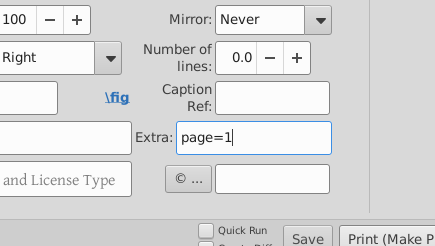
Seleccione la página del archivo PDF que deseamos, ingresando page=1 en el cuadro de extras:
-
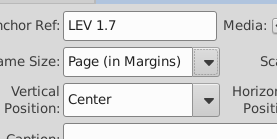
Establezca el tamaño… Queremos números de página aquí, así que seleccionaré Page (in Margins)
-
Presione imprimir, oh, miren, ahí está:
-
Agreguemos la otra página, esta vez sin números de página… así que Agregar imagen, seleccione el archivo y el número de página. Oigan, eso es extraño, ¿por qué page=1 sigue ahí? (@mjpenny)? Establezca el anclaje, LEV 1.7 de nuevo, establezca el tamaño de página en Page (to Edge) Y presione imprimir…
Oh. Sin imagen.
Parece que, mientras TeX puede manejar múltiples copias de 'la misma imagen' (incluso si es la página 2, no la página 1) en la misma referencia, la interfaz de usuario no quiere hacer eso por nosotros. Simplemente ignora la segunda página.
Establezcamos el anclaje para la primera página en LEV 1.6 y el de la segunda en LEV 1.7 (¡recuerde usar un punto, no dos puntos, al dar las referencias de anclaje!)
¡TaDa! tenemos ambas páginas. Cosas a notar:
- Las dos páginas se tratan como imágenes separadas cuando lo hace de esta manera.
- Si seleccionamos
Page (to Margins), entonces las líneas de cuadrícula, y los encabezados y pies de página se incluyen; si decimos Page (to Edge), no se incluyen.
- Si miró con atención, vería que hay una rosa en LEV1.6 además de la imagen de página completa. A XeTeX no le importan múltiples imágenes ancladas a un versículo, fue solo la interfaz de usuario que se puso quisquillosa y no escribió el archivo.
- El espejado y la rotación funcionan (aunque ¡quizás el espejado no sea la cosa más amable para hacer con el texto!)
Mark asked that there be something here about how to add pages from a PDF.
(see also inserting an entire PDF)
So, urm, here’s a first go.
Let’s assume we have a 2 page PDF… I’ve just made one. Here it is in 2 page view:
I’m using one of the test files, which has fancy section headers and single page ‘books’ for GEN, LEV (the page with roses), and MRK, which has 2 pages:
-
Put the file into the project’s figures directory (~/Paratext9Projects/PROJID/figures on linux). This simple step means that the file becomes available to others too, or even your other computers, when you’ve done send+receive with Paratext enough times on enough computers.
-
Open the figures tab on PTXprint and click on ‘Add’
-
Select the PDF file
-
Set the anchor reference. For this example, I’m working in a test file that has nothing between LEV 1.7 and MRK 1:1. I’ll tell it to include the image after LEV 1.7.
-
Select the page of the PDF file that we want, by entering page=1 in the extras box:
-
Set the size… We want page numbers here, so I’ll select Page (in Margins)
-
Press print, oh, look there it is:
-
Lets add the other page, this time without page numbers… so Add image, select the file, and the page number. Hey, that’s odd, why is page=1 still there? (@mjpenny)? Set the anchor, LEV 1.7 again, set the page size to be Page (to Edge) And hit print…
Oh. No picture.
It seems that while TeX can cope with multple copies of ‘the same image’ (even if it is page 2, not page 1) on the same reference, the user interface doesn’t want to do that for us. It just ignores the second page.
Let’s set the anchor for the first page to LEV 1.6 and the second to LEV 1.7 (remember to use a dot, not a colon when giving the anchor references!)
TaDa! we have both pages. Things to notice:
- The two pages are treated as separate images when you do it this way.
- If we select
Page (to Margins), then the grid lines, and page headers and footers get included, if we say Page (to Edge) they don’t.
- If you looked carefully, then you’d see that there’s a rose on LEV1.6 as well as the full page image. XeTeX doesn’t mind multiple images anchored to one verse, it was just the user interface getting uppity and not writing the file.
- Mirroring and rotation work (though perhaps mirroring isn’t the nicest thing to do to text!)
Traducción automática desde English








