哎呀!我們漏掉了 1.8 版本的公告,所以這裡有一篇簡短的文章,介紹 版本 1.9 中 PTXprint 的一些最新功能,讓您了解最新動態。
這些連結指向 EMDC 線上檔案庫(需要註冊才能存取),如果您覺得需要概覽 PTXprint 或 探索進階功能,這是一個很好的起點。
如果您還沒注意到,PTXprint 產品網站 已經重新結構化,不再擠在單一頁面上。如果您已經有一陣子沒有使用 PTXprint,您可能想看看 Gallery(展示區),裡面有目前使用此工具可以實現的效果範例。點擊任何圖片即可放大,並查看說明該功能重點的標題。如果您想知道 PTXprint 與 Publishing Assistant 有何不同,請查看這個頁面以獲得解釋。
新功能:
-
能夠在中央欄位中包含自動本地化的來自外部清單的交叉參考 - 類似於您在研讀本/參考聖經中看到的內容
其結果類似於下方所示的輸出:
-
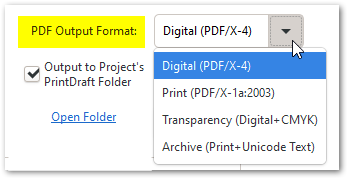
新增了針對 PDF 標準合規性的最佳化 PDF 輸出格式 選項
(數位=RGB、列印=CYMK、透明度和存檔)- 請參閱 Advanced(進階)分頁
-
Polyglot(多語種) 支援現在可在 TeX 宏中使用(但尚未包含在 PTXprint 中)
在我們繼續將此功能添加到(已經相當複雜的)使用者介面之前,我們很想知道有多少人對這個新功能感興趣,以及您的使用案例是什麼。請點擊 Reply(回覆) 告訴我們……
次要改進:
-
將難以找到的 Adv/Basic 模式滑桿改為 Show More/Less(顯示更多/更少) 按鈕
-
允許將 PDF 用作插圖(除了 jpg, tif, png, bmp 等之外)
-
允許頁面大小分隔符使用 , 或 x 作為尺寸分隔符
-
允許 PrintDraftChanges.txt 使用關鍵字 'at' 進行特定位置的更改,例如:
at GAL 3:16 "yesukrist" > "yesu krist" (only make this change in one verse)
at JHN "kurpa" > "permata daya"        (only make this change in one book)
at ROM 1:3 '\\v 3' > '\\v 3-4'         (blending verses for short marginal verses)
at ROM 1:4 '\\v 4 ' > ''
-
新增了即時橋接節的功能(對邊欄節很有用)
-
在設定雙語本(diglot)的次要專案時,新增了返回主要專案的按鈕
-
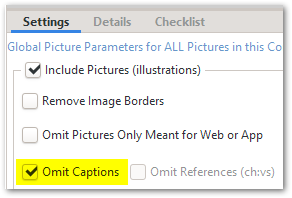
新增了為插圖省略標題的選項
-
新增鉤子(hook),允許在章節斷點時觸發呼叫者重置(透過在 .tex 檔案中使用自訂程式碼,可在章節斷點時重置腳註和交叉參考的呼叫者)
-
在排版模組時,在 Final SFM 分頁中顯示展開/扁平化的模組
-
改進了 Layout page(版面配置頁面) 上的邊距計算、措辭和圖形
-
改進了 AdjList 建立過程 的穩健性和準確性
-
改進了錯誤訊息中的上下文資訊,以幫助更好地追蹤問題
和往常一樣,還有數十個次要的錯誤修復。因此,絕對值得更新到最新版本。現在訪問下載頁面……
注意:\f 和 \x 的子標記現在遵循其父標記樣式的設定。因此,腳註和交叉參考的顯示方式可能會發生變化。建議您在嘗試手動修復設定之前,先重置這些樣式以使用預設設定。
Oops! We missed the announcement for 1.8, so here’s a quick post about version 1.9 bringing you up to speed on some of the newest features in PTXprint.
These links to the EMDC Online archives (which require you to be enrolled to access them) are a good place to start if you feel like you need to get an overview of PTXprint, or explore advanced features.
And if you haven’t yet noticed, the PTXprint product site has been restructured so that it is no longer crammed onto a single page. If it has been a while since you last used PTXprint, you may want to check out the Gallery with examples of what is currently possible with this tool. Click on any image to enlarge it and see the caption explaining which feature is in focus. And if you’re wondering about what makes PTXprint different from Publishing Assistant, then check out this page for an explanation.
New features:
-
Ability to include auto-localized cross-references from external lists in a center column - similar to what you would see in a study/reference Bible
Which results in output similar to what is shown below:
-
Added optimized PDF Output Format options for PDF standards compliance
(Digital=RGB, Print=CYMK, Transparency, and Archive) - see Advanced tab
-
Polyglot support is now available in the TeX macros (but not yet included in PTXprint)
Before we go ahead and add this feature to the (already quite complex) user-interface, it would be interesting to hear how many people are interested in this new feature, and what your use-case(s) would be. Hit Reply and let us know…
Minor improvements:
-
Changed the hard-to-find Adv/Basic mode slider to a Show More/Less button
-
Allow PDFs to be used as illustrations (in addition to jpg, tif, png, bmp, etc.)
-
Allow page size separator to use , or x as dimension separator
-
Allow PrintDraftChanges.txt to do location-specific changes using keyword ‘at’, for example:
at GAL 3:16 "yesukrist" > "yesu krist" (only make this change in one verse)
at JHN "kurpa" > "permata daya"        (only make this change in one book)
at ROM 1:3 '\\v 3' > '\\v 3-4'         (blending verses for short marginal verses)
at ROM 1:4 '\\v 4 ' > ''
-
Added ability for on-the-fly bridged verses (useful for marginal verses)
-
Added button to Return to primary project when configuring secondary project of diglot
-
Added option to Omit Captions for illustrations
-
Added hook to allow triggering of caller reset on chapter breaks (enables resetting footnote and cross-reference callers at chapter breaks by using custom code in .tex file)
-
Show expanded/flattened module in Final SFM tab when typesetting a module
-
Improved margin calculations, wording and graphics on the Layout page
-
Improved robustness and accuracy of AdjList creation process
-
Improved context information in error messages to help track issues better
And as usual there have been dozens of minor bug fixes. So it is certainly worth updating to the latest version. Visit the Download page now…
NOTE: The child markers of \f and \x now follow the settings of their parent marker styles. As a result there may be changes in the way footnotes and cross-references appear. It is recommended that you reset these styles to use the default settings prior to trying to remedy settings manually.
機器翻譯自 English








