Obrigado @ToddOwen e @Kirk por nos informarem sobre sua experiência inicial. Agora tenho uma terceira pessoa relatando o mesmo problema. Estamos investigando o problema e tentando descobrir por que isso pode estar acontecendo. Há alguma outra informação que possam nos dar sobre seu computador (por exemplo, você está executando o Windows como Administrador ou com direitos de usuário comuns (não-Admin)?)
Apenas tentei o PTXprint em outro computador e, ao ser executado pela primeira vez, ele apareceu assim:
e, de fato, o botão “Imprimir” está desativado. Mas assim que selecionei um projeto e um livro, ele mudou para habilitar o botão e outras páginas.
Outra coisa para tentar: Use o controle deslizante (um pouco oculto) para Mostrar Configurações Avançadas (Show Advanced Settings) e veja se algo muda:
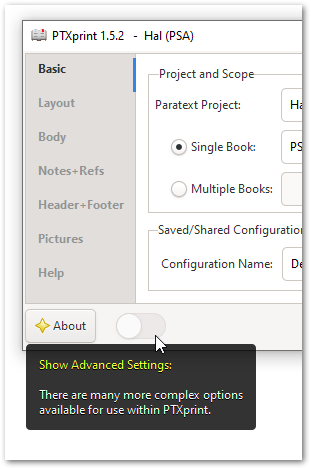
Você pode precisar fechar e reabrir o PTXprint para que isso tenha efeito.
Thank you @ToddOwen and @Kirk for informing us about your initial experience. I now have a third person reporting the same problem. We’re looking into the problem and trying to figure out why this might be. Is there any other information you can give us about your computer (for example, are you running Windows as an Administrator, or with ordinary (non-Admin) user rights?)
I just tried PTXprint on a different computer and it came up looking like this when first run:
and indeed the “Print” button is grayed out. But as soon as I selected a project and a book, then it changed to enable the button and other pages.
Something else to try: Use the (rather hidden) slider to Show Advanced Settings to see if anything changes:
You may need to close and re-open PTXprint for it to take effect.
Tradução automática de English








