Merci @ToddOwen et @Kirk de nous avoir informés de votre première expérience. J'ai maintenant un troisième cas signalant le même problème. Nous enquêtons sur le problème et essayons de comprendre pourquoi cela se produit. Pouvez-vous nous donner d'autres informations sur votre ordinateur (par exemple, exécutez-vous Windows en tant qu'administrateur, ou avec des droits d'utilisateur ordinaires (non-Admin) ?)
J'ai essayé PTXprint sur un autre ordinateur et, lors de la première exécution, il s'est affiché comme ceci :
et en effet, le bouton « Imprimer » est grisé. Mais dès que j'ai sélectionné un projet et un livre, le bouton et les autres pages sont devenus actifs.
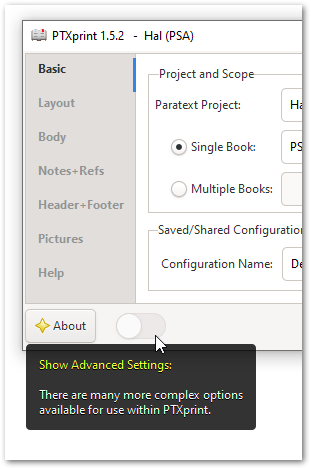
Autre chose à essayer : utilisez le curseur (plutôt caché) pour Afficher les paramètres avancés et voyez si quelque chose change :
Vous devrez peut-être fermer et rouvrir PTXprint pour que cela prenne effet.
Thank you @ToddOwen and @Kirk for informing us about your initial experience. I now have a third person reporting the same problem. We’re looking into the problem and trying to figure out why this might be. Is there any other information you can give us about your computer (for example, are you running Windows as an Administrator, or with ordinary (non-Admin) user rights?)
I just tried PTXprint on a different computer and it came up looking like this when first run:
and indeed the “Print” button is grayed out. But as soon as I selected a project and a book, then it changed to enable the button and other pages.
Something else to try: Use the (rather hidden) slider to Show Advanced Settings to see if anything changes:
You may need to close and re-open PTXprint for it to take effect.
Traduit automatiquement depuis English








