Gracias a @ToddOwen y @Kirk por informarnos sobre su experiencia inicial. Ahora tengo a una tercera persona reportando el mismo problema. Estamos investigando el problema e intentando averiguar por qué podría estar ocurriendo. ¿Hay alguna otra información que puedan darnos sobre su computadora (por ejemplo, ¿están ejecutando Windows como Administrador, o con derechos de usuario ordinarios (no Admin)?)
Acabo de probar PTXprint en otra computadora y al ejecutarlo por primera vez se veía así:
y efectivamente, el botón “Imprimir” está deshabilitado. Pero en cuanto seleccioné un proyecto y un libro, el botón y otras páginas se habilitaron.
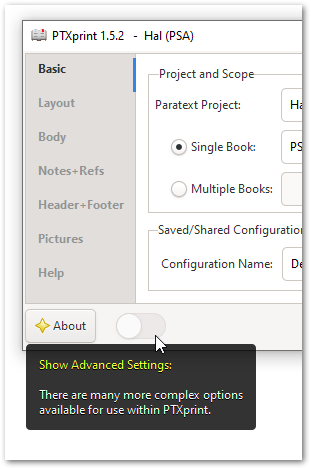
Otra cosa a probar: Use el control deslizante (bastante oculto) para Mostrar Configuración Avanzada y ver si algo cambia:
Es posible que necesite cerrar y volver a abrir PTXprint para que surta efecto.
Thank you @ToddOwen and @Kirk for informing us about your initial experience. I now have a third person reporting the same problem. We’re looking into the problem and trying to figure out why this might be. Is there any other information you can give us about your computer (for example, are you running Windows as an Administrator, or with ordinary (non-Admin) user rights?)
I just tried PTXprint on a different computer and it came up looking like this when first run:
and indeed the “Print” button is grayed out. But as soon as I selected a project and a book, then it changed to enable the button and other pages.
Something else to try: Use the (rather hidden) slider to Show Advanced Settings to see if anything changes:
You may need to close and re-open PTXprint for it to take effect.
Traducción automática desde English








