嗨,John。
一個簡單的方法是在數字設定中,將分數添加為「序數後綴」(Ordinal Suffixes)。
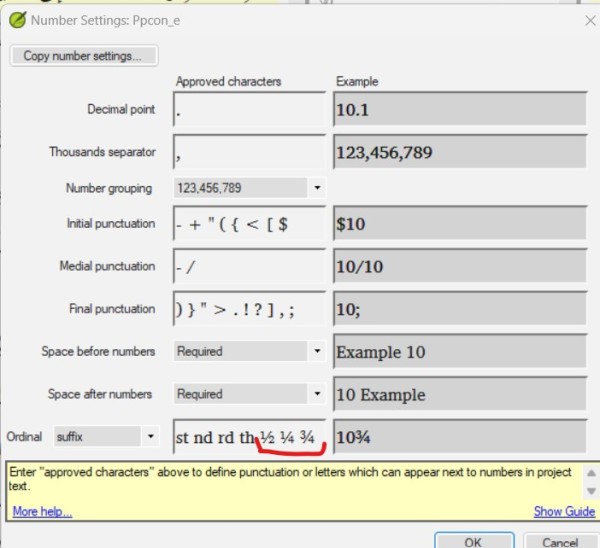
這樣,「數字驗證」(Number Verification)就會認為整數與分數相連(如 4½)是有效的。您仍然需要在「字符清單」(Character Inventory)中添加分數作為有效字符,以避免在「字符驗證」(Character Verification)中出現錯誤。
這裡的缺點是,雖然這些分數看起來符合您的需求,但 Paratext 實際上並未將它們視為數字。
---
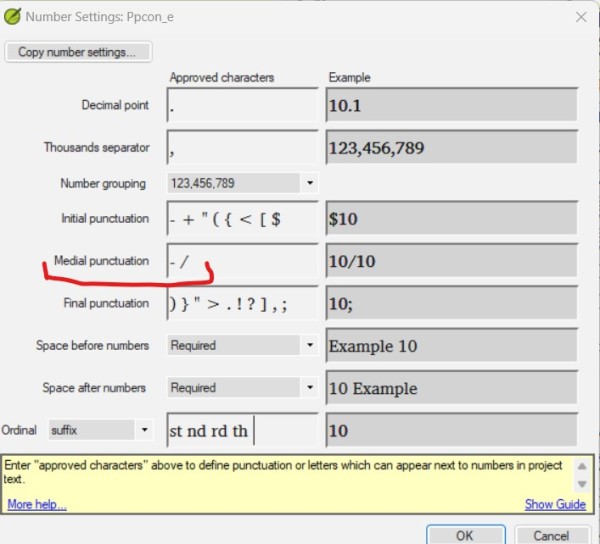
另一種方法是將數字以整數形式輸入,並使用中間標點符號「/」。對於您提到的情況,他們會輸入 4 1/2。如果在「數字設定」的「中間標點」(Medial Punctuation)中如此設定,Paratext 將接受斜線。他們還必須在「字符清單」中批准「/」,以免在「字符驗證」中出現錯誤。
當您想要列印時,很容易將例如 1/2 更改為 ½ (00BD),並將這些數字與整數結合(4½)。
----
我認為,任何其他強制將數字作為語言字符處理的方法,帶來的錯誤風險可能大於好處。
希望這能幫到您,
Pepe.
Hi John.
A simple way would be to add the fractions as Ordinal Suffixes, in the number configuration.
This way the Number Verification will consider valid to have the whole number attached to the fraction (4½). You will still need to add the fractions as valid characters in the Character Inventory, in order not to have errors in Character Verification.
The disadvantage here is that although these fractions look like you want them, Paratext is not actually treating them as numbers.
---
Another way is to put the numbers in integer form and use the medial punctuation "/". For the case you mention they would put 4 1/2. Paratext will accept the diagonal if it is set that way in the Medial Punctuation of the Number Settings. And they will have to approve the / in the Character Inventory so that they don't get an error in Character Verification.
When you want to print, it will be easy to change, for example, the 1/2 to ½ (00BD), and join these figures to a whole number (4½)
----
I think any other way of forcing numbers as language characters might bring more risks of errors than benefits.
I hope this helps,
Pepe.
機器翻譯自 English








