你好,John。
一种简单的方法是在数字配置中将分数添加为序数后缀(Ordinal Suffixes)。
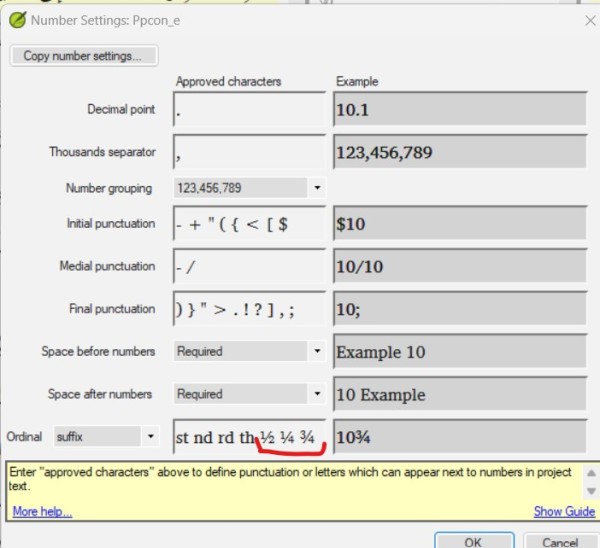
这样,数字验证(Number Verification)将认为整数与分数相连(4½)是有效的。您仍然需要在字符清单(Character Inventory)中将分数添加为有效字符,以免在字符验证(Character Verification)中出现错误。
这里的缺点是,虽然这些分数看起来符合您的要求,但 Paratext 实际上并未将它们作为数字处理。
---
另一种方法是将数字以整数形式输入,并使用中间标点符号“/”。对于您提到的情况,它们将输入 4 1/2。如果在“数字设置”的中间标点符号(Medial Punctuation)中这样设置,Paratext 将接受斜杠。并且他们必须在字符清单中批准“/”,以免在字符验证中出现错误。
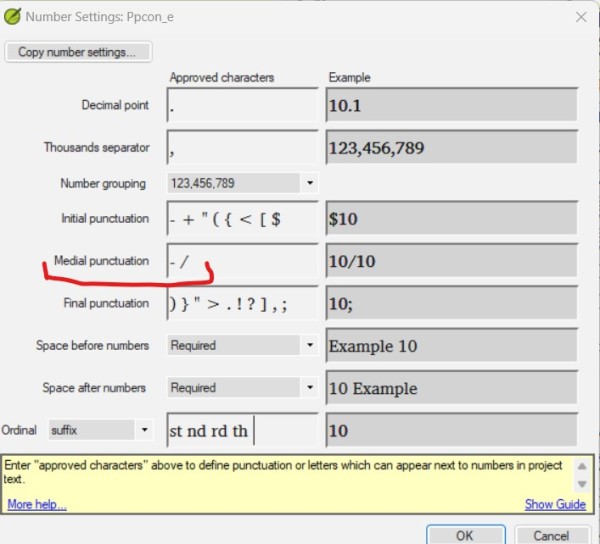
当您想要打印时,很容易将 1/2 更改为 ½ (00BD),并将这些数字与整数连接起来(4½)
----
我认为,任何其他强制将数字作为语言字符处理的方法,带来的错误风险可能大于其益处。
希望这有帮助,
Pepe。
Hi John.
A simple way would be to add the fractions as Ordinal Suffixes, in the number configuration.
This way the Number Verification will consider valid to have the whole number attached to the fraction (4½). You will still need to add the fractions as valid characters in the Character Inventory, in order not to have errors in Character Verification.
The disadvantage here is that although these fractions look like you want them, Paratext is not actually treating them as numbers.
---
Another way is to put the numbers in integer form and use the medial punctuation "/". For the case you mention they would put 4 1/2. Paratext will accept the diagonal if it is set that way in the Medial Punctuation of the Number Settings. And they will have to approve the / in the Character Inventory so that they don't get an error in Character Verification.
When you want to print, it will be easy to change, for example, the 1/2 to ½ (00BD), and join these figures to a whole number (4½)
----
I think any other way of forcing numbers as language characters might bring more risks of errors than benefits.
I hope this helps,
Pepe.
机器翻译自 English








