0
571 次浏览

项目中的全大写文本(ALL CAPITAL TEXT)对于排版人员来说是大忌,原因有很多。他们完全可以在 InDesign 中使用样式将文本设置为全大写。然而,在进行打印草稿(Print Draft)或将文本上传到 DBL 供 YouVersion 使用时,如果没有实际使用全大写字母,就无法确保文本是全大写的。(如果样式表中有一个“全大写”设置就好了。)

因此,我想出了一个巧妙的计划:利用 DBLChanges.txt 和 PrintDraftChanges.txt 文件中未记录的 RegEx Pal 大写功能 ^^^,将选定字段中的小写字母转换为大写。

例如,我们的斯瓦希里语翻译希望铭文文本(标记为 \sc …\sc*)使用全大写,而不是小型大写(Small Cap)。所以我想,我可以在 PrintDraftChanges.txt 中使用以下代码,将 \sc 文本导出为全大写:

in '(?<=\\sc\s)[^\\]*?(?=\\)': '(\p{Ll})' > '^^^\1'

但结果 Bwana 没有变成 BWANA,而是变成了 B^^^w^^^a^^^n^^^a

所以很明显,Changes.txt 文件的 RegEx 引擎并不支持这个在 RegEx Pal 中可用的巧妙但未记录的功能。

如果大小写转换是 Changes.txt 文件和 RegEx Pal 的已记录功能,那就太好了。我真的不想在我们的主发布文件中保留全大写文本,但如果我不这样做,有时我会需要即时创建它。

  • 有什么建议吗?你遇到过这种情况吗?你是如何决定处理的?
  • 还有其他人希望在 Paratext 的正则表达式中获得大小写转换功能吗?
  • 我应该将此提交为功能请求吗?
机器翻译自 English
Paratext (1.8k 分) 发布
已重新显示 | 571 次浏览

4 个回答

0
最佳答案

如果有效,就不算愚蠢:

in '(?<=\\sc\s)[^\\]*?(?=\\)': 'a' > 'A'
in '(?<=\\sc\s)[^\\]*?(?=\\)': 'b' > 'B'
in '(?<=\\sc\s)[^\\]*?(?=\\)': 'c' > 'C'
in '(?<=\\sc\s)[^\\]*?(?=\\)': 'd' > 'D'
in '(?<=\\sc\s)[^\\]*?(?=\\)': 'e' > 'E'
in '(?<=\\sc\s)[^\\]*?(?=\\)': 'f' > 'F'
in '(?<=\\sc\s)[^\\]*?(?=\\)': 'g' > 'G'
in '(?<=\\sc\s)[^\\]*?(?=\\)': 'h' > 'H'
in '(?<=\\sc\s)[^\\]*?(?=\\)': 'i' > 'I'
in '(?<=\\sc\s)[^\\]*?(?=\\)': 'j' > 'J'
in '(?<=\\sc\s)[^\\]*?(?=\\)': 'k' > 'K'
in '(?<=\\sc\s)[^\\]*?(?=\\)': 'l' > 'L'
in '(?<=\\sc\s)[^\\]*?(?=\\)': 'm' > 'M'
in '(?<=\\sc\s)[^\\]*?(?=\\)': 'n' > 'N'
in '(?<=\\sc\s)[^\\]*?(?=\\)': 'o' > 'O'
in '(?<=\\sc\s)[^\\]*?(?=\\)': 'p' > 'P'
in '(?<=\\sc\s)[^\\]*?(?=\\)': 'q' > 'Q'
in '(?<=\\sc\s)[^\\]*?(?=\\)': 'r' > 'R'
in '(?<=\\sc\s)[^\\]*?(?=\\)': 's' > 'S'
in '(?<=\\sc\s)[^\\]*?(?=\\)': 't' > 'T'
in '(?<=\\sc\s)[^\\]*?(?=\\)': 'u' > 'U'
in '(?<=\\sc\s)[^\\]*?(?=\\)': 'v' > 'V'
in '(?<=\\sc\s)[^\\]*?(?=\\)': 'w' > 'W'
in '(?<=\\sc\s)[^\\]*?(?=\\)': 'x' > 'X'
in '(?<=\\sc\s)[^\\]*?(?=\\)': 'y' > 'Y'
in '(?<=\\sc\s)[^\\]*?(?=\\)': 'z' > 'Z'
机器翻译自 English
(872 分) 发布

Hi CrazyRocky & anon719148

You can have multiple find/replaces stored in a file and run an
expression that points to that file in RegExPal. The syntax is to use
"–>"and then point to the filename with the replaces in the find box.
Similar to the following:

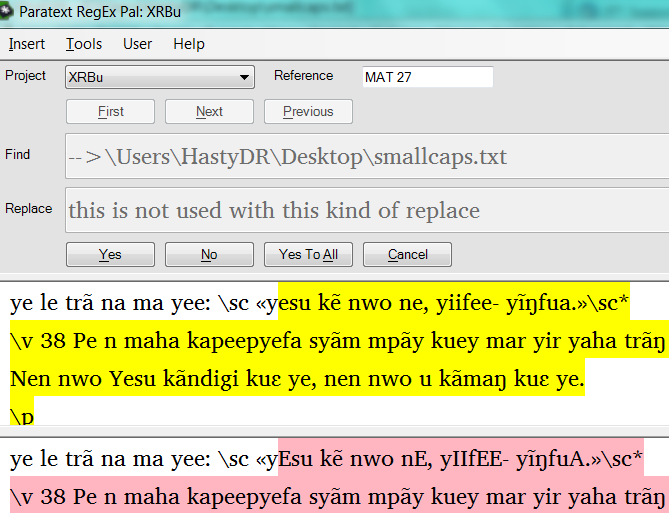
–>\Users\HastyDR\Desktop\smallcaps.txt

Note: I don’t think it works if the path name contains any spaces, which
is why I chose to place the file on my desktop.

In that file place statements similar to the following for all lower to
uppercase combinations in your language.

(?<=\\sc\s[^\\]*?)a-->A
(?<=\\sc\s[^\\]*?)e-->E
(?<=\\sc\s[^\\]*?)i-->I

Once the file is created, run RegExPal and place -->filenamein the find
box and run as a replace. Note that this kind of replace ignores any
text that may be in the replace dialog box.

See the sample in the following screen capture of the RegExPal screen below.

The way this change works is that it stops on the first match in a
chapter and selects the rest of the chapter. You will see each of the
changes in the replacement highlighted in pink. Notice the lower case
vowels in the highlighted yellow become uppercase in the highlighted pink.

Note that it changes the actual text in the project. Undo the changes by
switching the cases on the match and replace to get back to the original
encoding.

D anon467281

Global Publishing Services
Scripture Typesetting trainer & Regular Expression “specialist”
Dallas, TX
较早的帖子 - 以原始语言显示

你好 anon467281
我在另一个帖子中也有类似的问题。[链接已移除] 幸运的是,anon719148 把我指向了这个链接。

我尝试在 Devanagiri 脚本中使用 RegExPal 技巧,但它没有搜索到文本。而罗马脚本工作得很好

(?<=\xt\s[^\]?)यूह–>यूहन्‌ना
(?<=\xt\s[^\]
?)baba–>BABA

在上面的两个示例中,我在交叉引用中搜索,RegExPal 只能找到第二个(即 baba),但找不到第一个(即 यूह - 这是 Devanagiri 脚本)

你知道为什么非罗马脚本不起作用吗?

谢谢你的建议……

机器翻译自 English
0

这似乎完全没有文档记录。我们可以在哪里获取更多信息?
(我在这里回复,但这应该是一个独立的话题。)

机器翻译自 English
(872 分) 发布
0

我做了一些测试,因为这似乎可能是一个有用的功能。但在我看来,它非常不稳定。然而,在我的测试中,有时使用 Unicode 字符编号似乎效果更好(使用 BabelPad 进行转换),例如:

(?<=\xt\s[^\]?)\u092F\u0942\u0939–>यूहन्‌ना

但我从未能让 RegExPal 找到这两行;它似乎只有在“baba”不存在时才会搜索第一行。

机器翻译自 English
(607 分) 发布
0

这是关于在 RegEx Pal 中使用列表的另一个帖子。

机器翻译自 English
(9.9k 分) 发布

相关问题

0
8 个回答 1.5k 次浏览
We have a user who has inserted a lot of \pn and some \nd inside of footnotes. We now know we need those to be ... the search to inside of a single footnote? Thank you, MSEAIT/LT
MSEAIT_LT 478 发布 提问于 八月 20, 2018
0
5 个回答 756 次浏览
It appears that for all projects that I have created in PT8 RegEx Pal displays text in the find and replace windows using ... What do I need to do to stop this from happening?
Kent Spielmann 1.8k 发布 提问于 二月 26, 2018
0
3 个回答 978 次浏览
[There is no Help topic for RegEx Pal, so I'll start this thread for myself or anyone else to add helpful ... History panic (post #3) Key terms for search: regular expression
wdavidhj 1.4k 发布 提问于 六月 5, 2019
0
8 个回答 1.5k 次浏览
Can someone answer definitively: What flavour of regex is used in RegEx Pal? Scope in my title is to encourage people ... used in this context. See next post for an example.
wdavidhj 1.4k 发布 提问于 七月 20, 2016
+1
5 个回答 912 次浏览
我想在某些情况下将小写更改为大写--例如,我想将冒号后的所有小写字母更改为大写 在 RegEx Pal 中,没有单一的规则可以实现这一点,但有一个未记录的功能允许我创建一个简单更改的列表来运行 (注意:有一些正则表达式可以做到这一点,但在 ... A 可能还有其他一些事情不能按预期工作 如果您想尝试此方法,我建议从一个非常简单的列表开始,然后逐步添加内容
Phil_Leckrone 9.9k 发布 提问于 三月 2, 2022
Welcome to Support Bible, where you can ask questions and receive answers from other members of the community.
Every day they continued to meet together in the temple courts. They broke bread in their homes and ate together with glad and sincere hearts, praising God and enjoying the favor of all the people. And the Lord added to their number daily those who were being saved.
Acts 2:46-47
3,047 个问题
6,007 个回答
5,672 条评论
2,027 位用户







