Halo CrazyRocky & anon719148
Anda dapat menyimpan beberapa cari/ganti (find/replaces) dalam sebuah file dan menjalankan
ekspresi yang menunjuk ke file tersebut di RegExPal. Sintaksnya adalah menggunakan
"–>" dan kemudian menunjuk ke nama file dengan penggantian di kotak cari (find box).
Mirip dengan berikut:
–>\Users\HastyDR\Desktop\smallcaps.txt
Catatan: Saya tidak berpikir ini bekerja jika nama path mengandung spasi, itulah
mengapa saya memilih untuk menempatkan file di desktop saya.
Di file tersebut, letakkan pernyataan yang mirip dengan berikut untuk semua kombinasi
huruf kecil ke besar dalam bahasa Anda.
(?<=\\sc\s[^\\]*?)a-->A
(?<=\\sc\s[^\\]*?)e-->E
(?<=\\sc\s[^\\]*?)i-->I
Setelah file dibuat, jalankan RegExPal dan letakkan -->filename di kotak
cari (find box) dan jalankan sebagai penggantian. Perhatikan bahwa jenis penggantian ini mengabaikan
teks apa pun yang mungkin ada di kotak dialog penggantian.
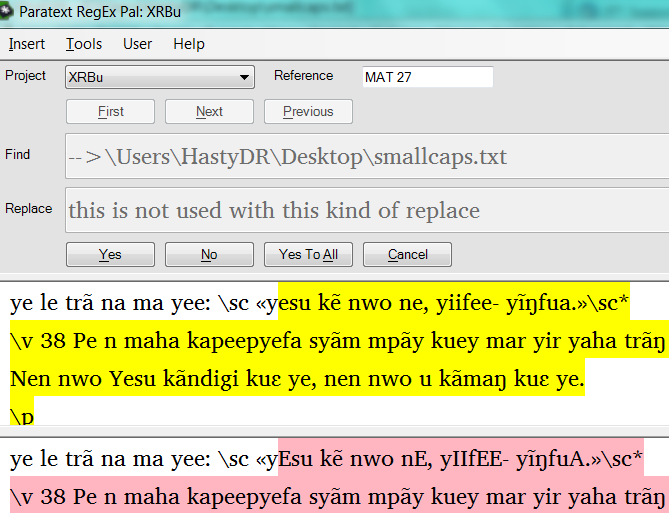
Lihat contoh di tangkapan layar RegExPal berikut.
Cara perubahan ini bekerja adalah dengan berhenti pada kecocokan pertama di
bab dan memilih sisa bab. Anda akan melihat setiap
perubahan dalam penggantian disorot dengan warna pink. Perhatikan huruf vokal kecil
yang disorot kuning menjadi huruf besar di sorotan pink.
Perhatikan bahwa ini mengubah teks aktual dalam proyek. Batalkan perubahan dengan
menukar kasus pada kecocokan dan penggantian untuk kembali ke
pengkodean asli.
D anon467281
Global Publishing Services
Pelatih Penataan Letak Kitab Suci & "spesialis" Ekspresi Reguler
Dallas, TX
cacnjcfmebdikdkd.png669×513 43.9 KB
Hi CrazyRocky & anon719148
You can have multiple find/replaces stored in a file and run an
expression that points to that file in RegExPal. The syntax is to use
"–>"and then point to the filename with the replaces in the find box.
Similar to the following:
–>\Users\HastyDR\Desktop\smallcaps.txt
Note: I don’t think it works if the path name contains any spaces, which
is why I chose to place the file on my desktop.
In that file place statements similar to the following for all lower to
uppercase combinations in your language.
(?<=\\sc\s[^\\]*?)a-->A
(?<=\\sc\s[^\\]*?)e-->E
(?<=\\sc\s[^\\]*?)i-->I
Once the file is created, run RegExPal and place -->filenamein the find
box and run as a replace. Note that this kind of replace ignores any
text that may be in the replace dialog box.
See the sample in the following screen capture of the RegExPal screen below.
The way this change works is that it stops on the first match in a
chapter and selects the rest of the chapter. You will see each of the
changes in the replacement highlighted in pink. Notice the lower case
vowels in the highlighted yellow become uppercase in the highlighted pink.
Note that it changes the actual text in the project. Undo the changes by
switching the cases on the match and replace to get back to the original
encoding.
D anon467281
Global Publishing Services
Scripture Typesetting trainer & Regular Expression “specialist”
Dallas, TX
cacnjcfmebdikdkd.png669×513 43.9 KB
Diterjemahkan secara otomatis dari English








