+1 vote

I don't believe that the MASTER SLIDES have sufficient information on setting up use of the Ornaments plugin in PTXprint. It jumps right into examples without talking about the setup steps. The What's New in PTXprint presentation has some more information, like setting up the Plugins field to say "ornaments". Now I have added \stylesheet{standardborders.sty} to the premods.tex file, and played a bit with the settings in the mods.tex file, but I haven't yet gotten any ornaments. What are the basic setup steps required?

PTXprint by (1.4k points)

1 Answer

0 votes

Unfortunately, the GUI isn't quite up to playing with ornaments at the moment (unless it's there as a normally hidden option, Mark?).

Basic steps are:
1. enable the plugin (put ornaments into the plugin list)
2. add \stylesheet{standardborders.sty} , assuming you're going to use them - you're welcome to define your own!

Decide... ornaments for zrule, or ornamental borders around textboxes, sidebars, or everything?
\zrule|cat="VectorianRule3" thick="5"\*

Here is an example for textborder, which uses a slimmed-down version of what you can set for a sidebar or a cat:titlebox|esb  / cat:headingbox|esb
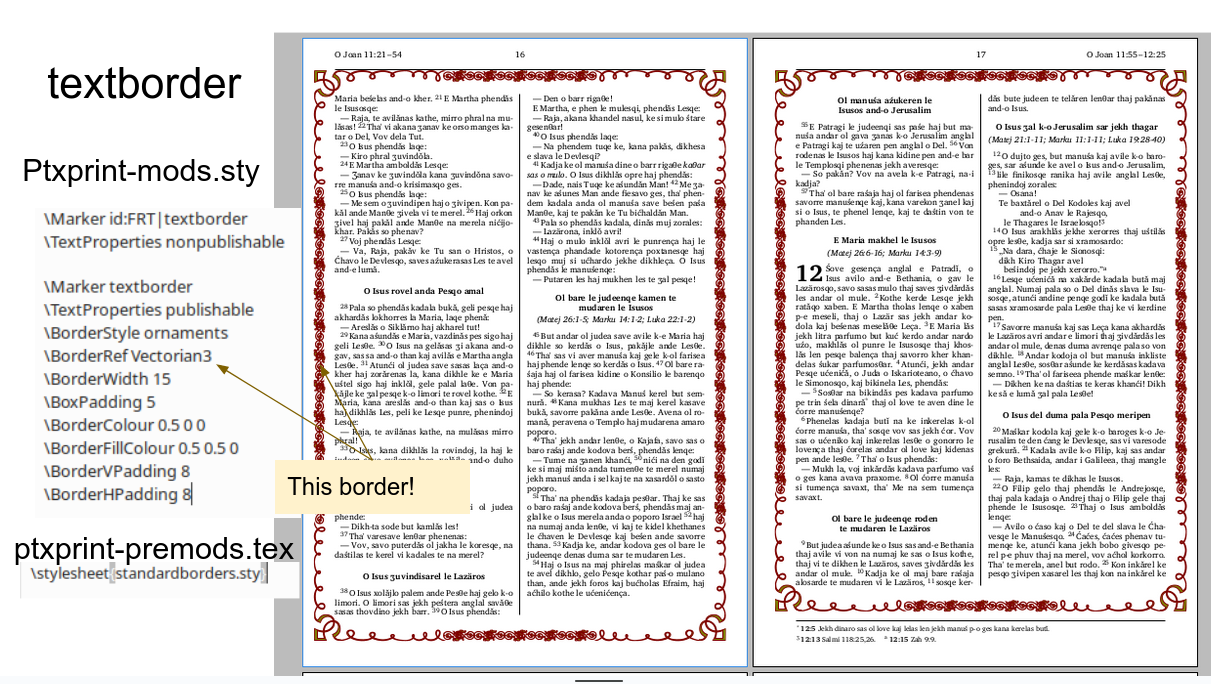
by (1.1k points)
Thanks for this. I saw reference somewhere in the training materials to a catalogue.pdf, which shows the different borders that are available. Where could I find that file?
It's part of the documentation on github https://github.com/sillsdev/ptx2pdf/tree/master/docs/documentation    The file is actually called OrnamentsCatalogue.pdf these days.
Welcome to Support Bible, where you can ask questions and receive answers from other members of the community.
How good and pleasant it is when God’s people live together in unity!
Psalm 133:1
3,033 questions
5,988 answers
5,659 comments
2,020 users







