Bonjour Maurice, il existe différentes façons de faire cela, mais ma méthode préférée consiste à utiliser le livre BAK (Back Matter) dans Paratext pour placer une ou plusieurs cartes sur leur propre page(s) à l'arrière de la publication.
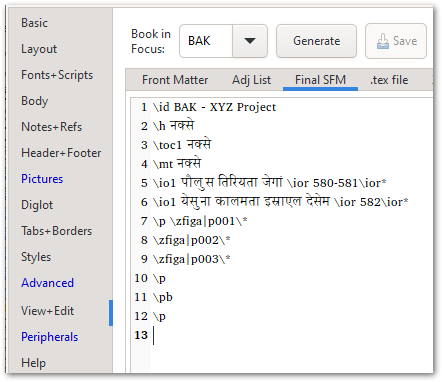
Dans le livre BAK ci-dessus, il y a un titre approprié, le marqueur \toc1 (qui s'assurera que « cartes » est ajouté automatiquement à la page de la Table des matières de la publication), et un \io intro-outline listant les deux cartes. Il y a en fait 3 images, mais comme j'avais besoin que la 1re carte soit divisée sur 2 pages, je l'ai coupée en deux et j'ai placé une moitié sur chaque page (c'est pourquoi j'ai p001, p002).
Les cartes elles-mêmes peuvent être ajoutées à la fin de la PicList comme indiqué ici - et c'est là que vous contrôlez la taille, la position, la légende (si nécessaire) et ainsi de suite.
Cela se présentera ainsi sur la page de titre de la section des cartes :

et les pages 580-581 contiendront les deux moitiés de la 1re carte (image recadrée ici) :
Et la dernière page affichera la 2e carte :
Si vous souhaitez éviter d'utiliser le livre BAK, vous pouvez simplement ajouter le \zfiga|mapID\* à la fin du livre que vous mettez en page, et tant que la « Frame Size » est réglée sur « Page » ou « Full », elle devrait se retrouver sur sa propre page.
Bien sûr, vous pouvez également simplement ajouter un PDF à la fin de la publication (voir l'onglet Peripherals de PTXprint pour les options à ce sujet).
Beaucoup de choix - j'espère que l'un d'entre eux convient bien à votre contexte.
Hi Maurice, there are different ways of achieving this, but my preferred way is to use the BAK (Back Matter) book in Paratext to place one or more maps on their own page(s) at the back of the publication.
In the BAK book shown above, there is proper title, the \toc1 marker (which will ensure that “maps” is added to the publication’s Table of Contents page automatically), and an \io intro-outline listing the two maps. Actually there are 3 images, but since I needed the 1st map to split across 2 pages, I cut it in half and then placed one half on each page (that’s why I have p001, p002).
The maps themselves can be added to the end of the PicList as shown here - and this is where you would control the size, position, caption (if needed) and so on.
This would end up showing this on the Title page of the maps section:
and then pages 580-581 would contain the 2 halves of the 1st map (cropped image here):
And the last page would show the 2nd map:
If you want to avoid using the BAK book, you could just add the \zfiga|mapID\* at the end of the book you’re typesetting, and as long as the “Frame Size” is set to “Page” or “Full”, it should end up on its own page.
Of course, you can also just tack a PDF on to the end of the publication (see the Peripherals tab of PTXprint for options there).
Plenty of choices - hopefully one of them works well for your context.
Traduit automatiquement depuis English








