Hmm. Je suppose que l'introduction du livre est dans le fichier 01GENproject.SFM ? S'il était dans le livre INT, vous pourriez essayer de l'insérer au préalable.
\zgetperiph|INTGEN\*
Je pense que cela fonctionnerait, mais ce n'est pas garanti.
Sinon… vous devrez suivre manuellement les numéros de page, car le fichier de contrôle généré par python a déjà réinitialisé le numéro de page à 1, juste avant que le fichier sfm ne soit lu.
Mais si vous acceptez cette limitation, vous pourriez ensuite utiliser des hooks pour le réinitialiser manuellement, par exemple :
\setbookhook{start}{GEN}{\pageno=-5}
\setcvhook{GEN1.1}{\pageno=1}
Maintenant, vous avez simplement les problèmes suivants :
- Si votre titre, introduction, etc. se termine avec un nombre impair de pages, vous devrez forcer une page blanche.
\zNeedOddPage est probablement votre ami ici.
- vous devrez supprimer la page blanche automatique avant l'Écriture (onglet périphériques).
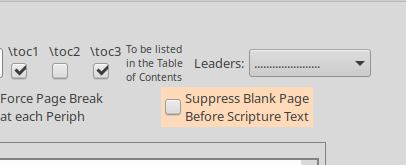
- vous avez probablement besoin d'activer « commencer un nouveau livre sur la même page » ou comme cela s'appelle.
Si vous êtes vraiment enthousiaste à l'idée de travailler sur une solution générale, je viens de pousser un correctif à moitié élaboré pour préserver le numéro de page de l'introduction dans \oldpageno
Hmm. I assume the book introduction is in the 01GENproject.SFM file? If it were in the INT book, then you could try to pull it in beforehand.
\zgetperiph|INTGEN\*
I think that would work, but it’s not guaranteed.
Otherwise… you’ll need to manually keep track of page numbers, because the control file that python generates has already reset the page number to 1, just before the sfm file gets read.
But if you accept that shortcoming, you could then use hooks to manually reset it, something like:
\setbookhook{start}{GEN}{\pageno=-5}
\setcvhook{GEN1.1}{\pageno=1}
Now you just have the following problems:
- If your title, introduction, the. ends up with an odd number of pages, you will need to force a blank page.
\zNeedOddPage is probably your friend here.
- you’d need to suppress the automatic blank page before scripture (peripherals tab).
- you probably need to turn on ‘start new book on the same page’ or whatever it’s called.
If you’re really keen on working on a general solution, I’ve just pushed a half-baked work-around for preserving the introduction’s page number in \oldpageno
Traduit automatiquement depuis English








